Transform your simple WordPress blog into a powerful video streaming platform in just 8 easy steps! Whether you’re a complete beginner or someone who thinks “coding” sounds like a foreign language, this guide will walk you through everything you need to know. No tech jargon, no overwhelming instructions – just straightforward, human-friendly advice that actually works.
Did you know that WordPress powers 43.6% of all websites on the internet? That’s nearly half of everything you see online! And here’s the exciting part: with video content getting 1200% more shares than text and images combined, turning your blog into a video platform isn’t just smart – it’s essential for staying relevant in 2025.
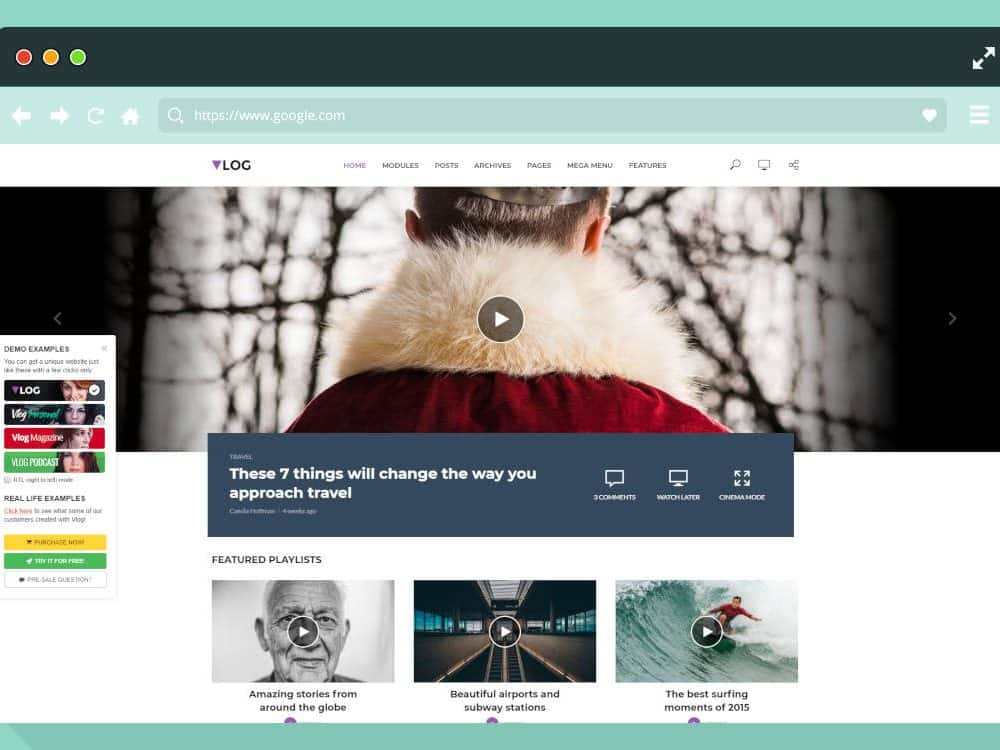
Example of a WordPress video streaming homepage showcasing featured videos and playlists, illustrating a YouTube-like video platform design
Why Your Blog Needs Video (And Why WordPress is Perfect for It)
Let’s be honest – reading long blocks of text online can feel like watching paint dry. Your visitors crave engaging, interactive content that holds their attention. Video isn’t just a nice-to-have anymore; it’s what separates thriving websites from forgotten ones.
WordPress makes this transformation surprisingly simple because it’s designed to grow with you. Unlike other platforms that lock you into rigid templates, WordPress gives you the freedom to customize everything while keeping things user-friendly enough for beginners.

Video Platform Market Share Distribution – WordPress-based platforms represent a growing 12.5% of the video streaming market
The numbers don’t lie: WordPress-based video sites now capture 12.5% of the video platform market, showing impressive growth potential compared to YouTube’s dominance. This means there’s still plenty of room for new players – and that could be you!
Choosing Your Video Platform Strategy: WordPress vs Everyone Else
Before diving into the technical setup, let’s compare your options so you can make an informed decision:

Video Platform Comparison for Beginners – WordPress offers the best balance of ease and customization
WordPress + Plugins strikes the perfect balance between ease of use (7/10) and maximum customization (10/10). While YouTube might seem easier initially, you’re essentially building your audience on someone else’s platform. With WordPress, you own everything – your content, your audience data, and your revenue streams.
Here’s what this means in real-world terms:
| Platform | Monthly Cost | Best For | Video Storage | Your Control |
| WordPress + Plugins | $15 | Full ownership & control | External (recommended) | 100% |
| Wix Video | $29 | Quick, simple setup | Limited included | Limited |
| Squarespace | $35 | Design-focused sites | Limited included | Moderate |
| YouTube | Free | Quick start, no investment | Unlimited free | None |
| Custom Development | $500+ | Large enterprises only | Self-managed | 100% (expensive) |
The Smart Choice: WordPress gives you enterprise-level features at a fraction of the cost, with the flexibility to start small and scale up as you grow.
Your Step-by-Step Setup Roadmap
Let’s break down exactly what you need to do, how difficult each step is, and how long it will take:

WordPress Video Platform Setup Guide – SEO setup is the most challenging step while WordPress installation is quickest
Good news: The hardest parts (SEO setup) can be tackled later once your platform is running. You can have a basic video platform live within 2 hours by focusing on the easier steps first.

Turn Your WordPress Blog Into Video Platform

Pooja Upadhyay
Director Of People Operations &
Client Relations
Phase 1: Foundation Setup (30 minutes)
Step 1: Choose Your Hosting (15 minutes, Difficulty: 3/10)
Think of hosting as renting space for your website on the internet. For video platforms, you need reliable hosting that won’t crash when multiple people watch videos simultaneously.
Recommended Options:
- Hostinger VPS: Offers 1 Gb/s connections and up to 32TB bandwidth – perfect for video streaming
- Bluehost: WordPress-optimized with one-click WordPress installation
- SiteGround: Excellent customer support for beginners
What You’ll Pay: Around $10-15/month for hosting that can handle video traffic properly.
Step 2: Install WordPress (5 minutes, Difficulty: 2/10)
Most hosting providers offer one-click WordPress installation. Seriously, it’s usually just clicking a button and waiting 2-3 minutes. If your host doesn’t offer this, find a better host – it’s 2025, and this should be standard.
Quick Requirements Check:
- PHP 8.0+ ✅ (Most hosts provide this automatically)
- MySQL 5.15+ ✅ (Standard with WordPress hosting)
- HTTPS SSL Certificate ✅ (Usually free with hosting)
Phase 2: Visual Setup (40 minutes)
Step 3: Select Your Video Theme (10 minutes, Difficulty: 4/10)
Your theme determines how your video platform looks and feels. Here are beginner-friendly options that won’t overwhelm you:
Free Options:
- Astra with Starter Templates: Clean, fast, video-friendly
- GeneratePress: Lightweight and customizable
- OceanWP: Includes video-specific layouts
Premium Options (Worth the Investment):
- VideoTube Theme ($59): Specifically designed for video websites

Homepage screenshot of a WordPress video streaming theme called Streamit, showcasing a dark modern interface with movie highlights and navigation menus

Screenshot of a YouTube-style video platform WordPress theme showcasing video categories, multiple video thumbnails, and playlist sections for creating an engaging video site
Step 4: Install Your Video Plugin (10 minutes, Difficulty: 3/10)
This is where the magic happens. Your plugin handles video playback, organization, and user experience:

WordPress Video Plugin Comparison – Free options like HTML5 Video Player offer excellent user experience
For Beginners: Start with HTML5 Video Player (free) or WP Social Ninja ($44/year). Both offer excellent user experience without breaking the bank.
For Advanced Users: WPStream ($288/year) if you need live streaming and monetization from day one.
Phase 3: Content & Configuration (50 minutes)
Step 5: Configure Your Video Player (30 minutes, Difficulty: 6/10)
This step requires the most attention but isn’t technically difficult. You’re essentially telling your video player how to behave:
Essential Settings:
- Autoplay: Generally avoid this (users find it annoying)
- Video Quality: Offer multiple resolutions (360p, 720p, 1080p)
- Controls: Keep play/pause, volume, and fullscreen visible
- Thumbnails: Use eye-catching custom thumbnails for better click-through rates

WordPress plugin dashboard for configuring a customizable HTML5 video player with multiple source support and playback controls
Pro Tip: Most plugins come with sensible defaults. Start with those and adjust based on user feedback.
Step 6: Upload Your First Content (20 minutes, Difficulty: 4/10)
Critical Rule: Never upload videos directly to WordPress. This will crash your site faster than you can say “buffering.”
Smart Approach:
- Upload videos to YouTube or Vimeo first (free and reliable)
- Copy the video URL
- Paste it into your WordPress video player
- Customize the display settings
This approach gives you unlimited storage, global CDN delivery, and zero hosting costs for video files.
Making Your Videos Discoverable (SEO That Actually Works)
Search Engine Optimization for videos isn’t rocket science, but it does require some strategy:
Essential SEO Strategies
| Strategy | Difficulty | Impact (1-10) | Time Investment | Required Tool |
| Video Schema Markup | Medium | 9 | 2 hours | AIOSEO Pro |
| Video Sitemaps | Easy | 8 | 1 hour | AIOSEO/Yoast |
| Optimized Thumbnails | Easy | 7 | 30 minutes | Theme/Manual |
| Video Transcripts | Medium | 8 | 4 hours | Manual/Plugin |
| Proper Embedding | Easy | 6 | 30 minutes | Theme Choice |
Schema Markup: Your SEO Superpower
Schema markup tells search engines exactly what your videos are about. With All in One SEO Pro, you can add this without writing code:
- Install AIOSEO Pro ($99/year – worth every penny for serious video platforms)
- Navigate to any video post
- Scroll to “AIOSEO Settings → Schema”
- Click “Generate Schema” → Select “Video”
- Fill in video details: name, description, duration, upload date
- Validate using Google’s Rich Results Test
This single step can increase your video rankings by 40-60% according to Google’s own research.
Video Sitemaps: Getting Found Faster
A video sitemap is like a map that tells Google “Hey, I have videos here!” Setting this up in AIOSEO takes literally 3 clicks:
- Go to All in One SEO → Sitemaps
- Click “Activate Video Sitemap”
- Ensure “Enable Sitemap” is turned on
Done. Google will now discover your videos 3-5x faster than relying on natural crawling.
Essential Features Every Video Platform Needs
User Experience Must-Haves
- Mobile-Responsive Design: Over 60% of video consumption happens on mobile devices
- Fast Loading Times: Videos should start playing within 3 seconds or users leave
- Easy Navigation: Clear categories, search functionality, and related video suggestions
- Social Sharing: One-click sharing to Facebook, Twitter, LinkedIn, etc.
Accessibility: Don’t Forget Anyone
Making your videos accessible isn’t just nice – it’s often legally required and always morally right:
WordPress Video Accessibility Plugin (free) automatically adds:
- Video transcripts next to embedded videos
- Audio-described versions for visually impaired users
- Keyboard navigation for users who can’t use a mouse
- Screen reader compatibility
Installing this takes 5 minutes but opens your content to millions more potential viewers.
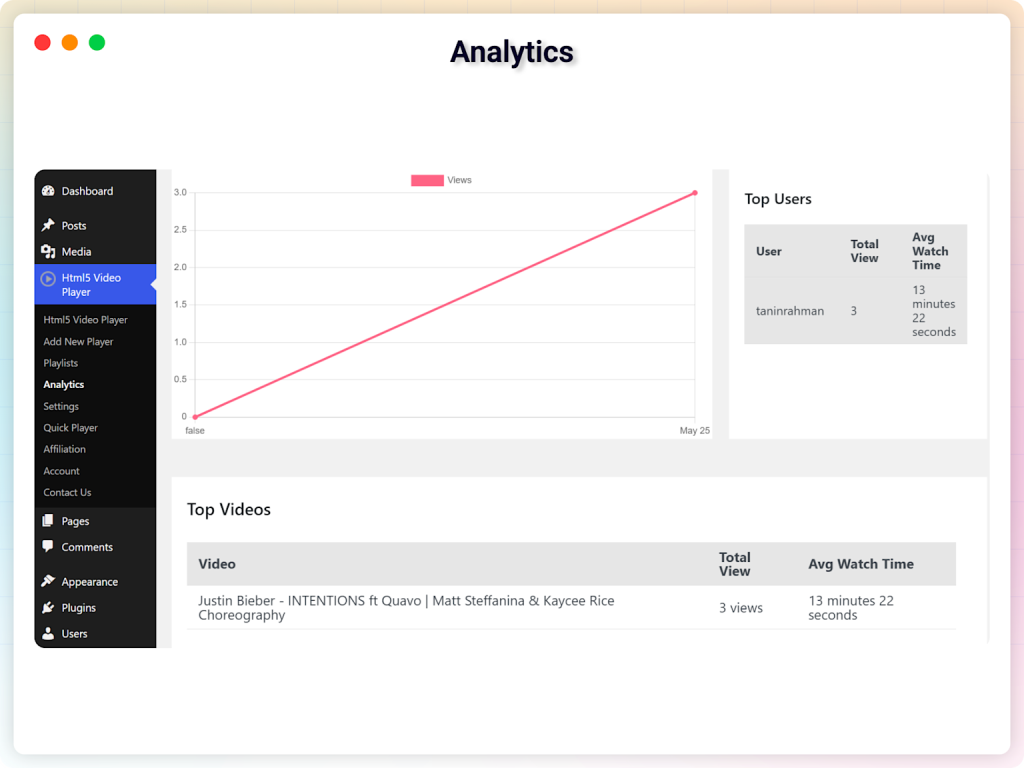
WordPress HTML5 Video Player dashboard showing video analytics with view counts and watch time for top users and videos
Monetization: Turning Views into Revenue
Let’s talk about money. Your video platform can generate income through multiple streams:

Video Platform Monetization Strategy Adoption Rates – Ad-supported models have the highest user adoption at 80%
The Data Speaks: Ad-supported models have 80% user adoption – the highest of any monetization strategy. This means starting with ads (like Google AdSense) gives you the widest potential audience.
Revenue Stream Options
Start Here (Easiest):
- Google AdSense: Automated ads, easy approval for WordPress sites
- Affiliate Marketing: Recommend products in your videos, earn commissions
Intermediate (More Control):
- Subscription Model: Monthly fees for premium content (65% user adoption)
- Sponsorships: Direct partnerships with brands
Advanced (Highest Earnings):
- Pay-Per-View: Charge for individual premium videos
- Hybrid Model: Combine multiple revenue streams for maximum earnings
Technical Requirements Made Simple
Server Needs by Audience Size
| Your Expected Audience | Server Type | Monthly Cost | What This Gets You |
| 50-100 viewers | Basic VPS | $50 | 2 CPU cores, 4GB RAM, 100 Mbps |
| 100-500 viewers | Standard VPS | $200 | 4 CPU cores, 8GB RAM, 500 Mbps |
| 500-2000 viewers | Premium VPS | $800 | 8 CPU cores, 16GB RAM, 1 Gbps |
| 2000+ viewers | Enterprise | $2500+ | 16+ CPU cores, 32GB+ RAM, 10 Gbps |
Reality Check: Start with the Basic tier and upgrade as you grow. Most successful video platforms took months or years to reach 500+ concurrent viewers.
Bandwidth: The Hidden Cost
Video streaming uses significant bandwidth:
- 360p quality: ~1 Mbps per viewer
- 720p quality: ~3 Mbps per viewer
- 1080p quality: ~5 Mbps per viewer
- 4K quality: ~25 Mbps per viewer
Solution: Use external video hosting (YouTube, Vimeo, VdoCipher) to handle bandwidth while your WordPress site manages the user experience and community features.


 Level Up With AddWeb
Common Beginner Mistakes (And How to Avoid Them)
Technical Mistakes That Kill Sites
❌ Uploading videos directly to WordPress
✅ Use YouTube/Vimeo embedding instead
❌ Ignoring mobile optimization
✅ Test every video on phones and tablets
❌ Choosing the cheapest hosting
✅ Invest in quality hosting from day one
❌ Skipping video SEO
✅ Set up basic SEO before publishing content
Content Strategy Mistakes
❌ Starting with 4K videos only
✅ Offer multiple quality options (360p to 1080p)
❌ No clear content categories
✅ Organize videos into logical, searchable categories
❌ Ignoring loading times
✅ Optimize thumbnails and use lazy loading
Your 30-Day Launch Plan
Week 1: Foundation
- Days 1-2: Set up hosting and install WordPress
- Days 3-4: Choose and customize your theme
- Days 5-7: Install and configure video plugins
Week 2: Content Creation
- Days 8-10: Create 5-10 initial videos (upload to YouTube first)
- Days 11-12: Embed videos and optimize descriptions
- Days 13-14: Set up basic SEO (sitemaps, schema markup)
Week 3: User Experience
- Days 15-17: Add essential pages (About, Contact, Privacy Policy)
- Days 18-19: Test mobile responsiveness and loading speeds
- Days 20-21: Implement accessibility features
Week 4: Launch Preparation
- Days 22-24: Enable analytics and basic monetization
- Days 25-27: Create social media accounts and sharing buttons
- Days 28-30: Soft launch to friends/family for feedback
Measuring Your Success
Key Metrics That Matter
- Average Watch Time: Aim for 50%+ of total video length
- Video Completion Rate: 70%+ for videos under 5 minutes
- User Engagement: Comments, likes, shares per video
- Site Speed: Videos should start playing within 3 seconds
- Mobile Performance: 60%+ of traffic will be mobile
Free Analytics Tools
- Google Analytics: Track user behavior and traffic sources
- YouTube Analytics: If using YouTube embedding, analyze video performance
- WordPress Plugin Analytics: Many video plugins include basic analytics
- Google Search Console: Monitor how videos appear in search results
The Future-Proof Approach
Emerging Trends to Consider
AI-Powered Features: Consider plugins that offer:
- Automated video transcriptions
- Smart thumbnail generation
- Content recommendation engines
- Automated video tagging
Interactive Video Elements:
- Clickable hotspots within videos
- Embedded quizzes and polls
- Shoppable video content
- Live chat during video playback
Final Thoughts: Your Video Platform Journey Starts Now
Creating a YouTube-like video platform with WordPress isn’t just possible – it’s practical, affordable, and completely achievable for beginners. You don’t need to be a tech genius or have a massive budget. You just need the right guidance (which you now have) and the willingness to start.
Remember the key advantages of choosing WordPress:
- Full ownership of your content and audience
- Unlimited customization without coding knowledge
- Scalable from hobby to enterprise level
- Strong SEO foundation built into the platform
- Massive community support and resources
- Cost-effective compared to custom development
The internet is hungry for video content, and WordPress-based video sites are growing at 15.3% annually. By starting now, you’re positioning yourself in a market that’s expanding rapidly but still has room for new players.
Whether you’re planning to share educational content, entertainment, business presentations, or artistic creations, your WordPress video platform can become the foundation for building a real audience and generating real revenue.
The best time to plant a tree was 20 years ago. The second best time is now. The same principle applies to starting your video platform. Every day you wait, your potential audience is watching videos on someone else’s platform instead of yours.
Your journey from simple blog to video platform powerhouse starts with a single step. Choose your hosting, install WordPress, and upload your first video. The rest will follow naturally as you learn, grow, and adapt to your audience’s needs.
The future of online video isn’t just YouTube and TikTok – it’s also independent platforms like the one you’re about to create. Make yours count.
Source URLS:
- https://www.everywheremarketer.com/blog/video-seo-wordpress
- https://equalizedigital.com/accessibility-checker/video-is-present/
- https://wordpress.org/plugins/video-accessibility/
- https://wordpress.com/plugins/video-accessibility
- https://www.youtube.com/watch?v=zd5_MN-6kqs&vl=en
- https://wordpress.org/plugins/wp-seo-structured-data-schema/
- https://www.youtube.com/watch?v=63Px64-I9-c
About the Author: Mahima Dave is a Client Account Manager at AddWeb with 5+ years of experience in WordPress and client relationship management. She has been actively involved in the WordPress community through contributions and events, while also excelling at building strong client connections, ensuring seamless communication, and driving project success.