The WordPress security landscape has never been more challenging—or more critical to understand. With over 6,700 new vulnerabilities discovered in just the first half of 2025 and 41% of them exploitable in real-world attacks, website owners face an unprecedented level of risk. But here’s the thing: while threats are evolving at breakneck speed, so are our defenses.
If you’re running a WordPress site in 2025, you’re not just managing a website—you’re defending a digital fortress that’s under constant siege. The good news? With the right knowledge and tools, you can build an impenetrable defense system that keeps even the most sophisticated attackers at bay.
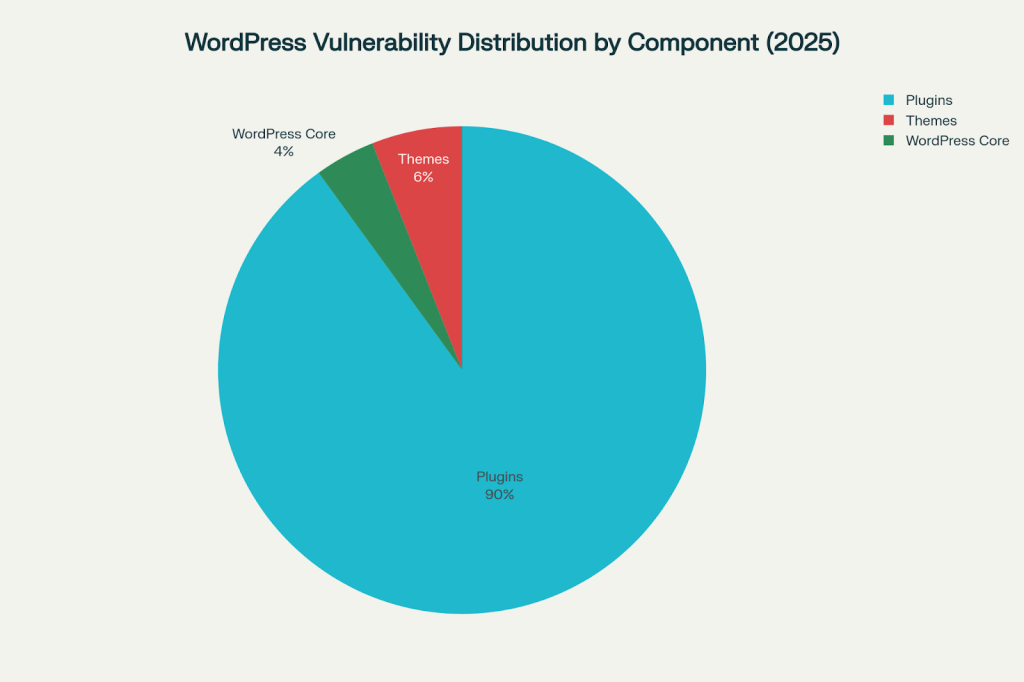
WordPress vulnerability distribution showing that plugins account for 90% of security issues, while themes and core contribute 6% and 4% respectively
The Alarming Reality: WordPress Under Attack
Let’s start with some eye-opening statistics that’ll make you want to check your site’s security right now. WordPress faces an average of 90,000 attacks per minute, with more than 500 WordPress websites hacked every day. That’s not a typo—every single day, hundreds of sites fall victim to cyberattacks.
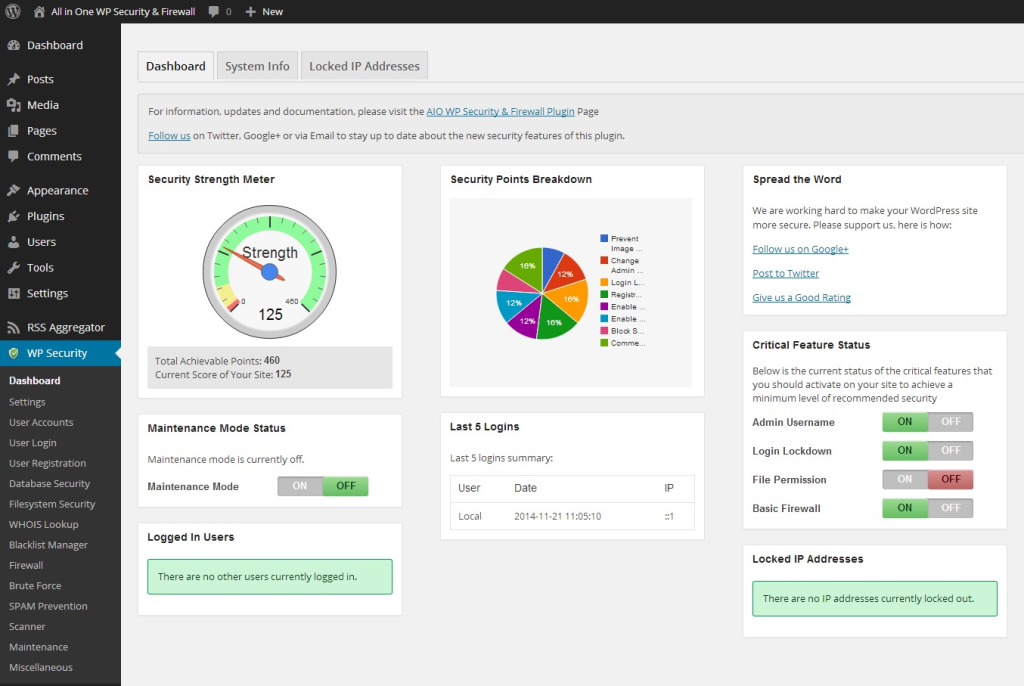
WordPress security dashboard showing real-time security strength, feature statuses, and login activities using the All In One WP Security & Firewall plugin
The numbers paint a sobering picture of today’s threat landscape:
- 64,782 total vulnerabilities currently tracked across the WordPress ecosystem
- 7,966 new vulnerabilities discovered in 2024 alone—a staggering 34% increase over 2023
- 96% of respondents have faced at least one security incident, with 64% suffering a full breach
What makes these statistics even more concerning is the source of these vulnerabilities. Plugins account for 90% of all WordPress security issues, while themes contribute 6% and WordPress core itself only 4%. This means the very extensions that make WordPress so powerful and flexible are also its greatest security weakness.

Line chart showing the trend of WordPress vulnerabilities from 2022 to 2025, highlighting a significant spike in 2024
2025’s Emerging Threat Landscape
AI-Powered Attacks: The Game Changer
The biggest shift in 2025’s threat landscape isn’t just more attacks—it’s smarter attacks. Cybercriminals are now leveraging artificial intelligence to create attack patterns that adapt in real-time, learn from your site’s defenses, and evolve faster than traditional security measures can respond.

Hacker interacting with virtual digital screen symbolizing cybersecurity threats and hacking risks
These AI-powered attacks are particularly dangerous because they can:
- Automate vulnerability discovery across thousands of sites simultaneously
- Adapt attack vectors when initial attempts fail
- Bypass traditional security measures through machine learning
- Scale attacks to unprecedented levels without human intervention

Defend Your WordPress Site Like a Pro – Start Securing Today

Pooja Upadhyay
Director Of People Operations &
Client Relations
The Plugin Vulnerability Crisis Continues
Plugins remain the #1 vulnerability culprit in 2025. With over 112,272 tracked plugins in the WordPress ecosystem, the attack surface is massive. Many site owners install plugins without considering their security implications, creating a perfect storm of risk.

Horizontal bar chart showing the most common WordPress vulnerability types, with XSS attacks leading at 35% of all vulnerabilities
The most common vulnerability types in 2025 include:
- Cross-Site Scripting (XSS): 35% of all vulnerabilities
- SQL Injection: 18% of vulnerabilities with a severity rating of 9.2/10
- Authentication Bypass: 12% of vulnerabilities
- File Upload vulnerabilities: 10% of vulnerabilities
Theme-Based Attacks Gain Momentum
While plugins get most of the attention, theme security is under more scrutiny in 2025. Premium themes, in particular, are becoming attractive targets because their code isn’t as readily available for security research, making vulnerabilities harder to detect until they’re actively exploited.
The Human Cost of Poor Security
Behind every security statistic is a real person whose business, livelihood, or passion project has been compromised. Security breaches cost more than just money—they destroy trust, damage reputations, and can take months or even years to recover from fully.
Consider Sarah, a small business owner whose WordPress e-commerce site was compromised through an outdated plugin. Not only did she lose three days of sales revenue, but customer data was exposed, leading to lost trust and a damaged reputation that took months to rebuild. Her story isn’t unique—it’s happening to hundreds of site owners every day.
Building Your 2025 Defense Strategy
Critical Priority #1: Enable Two-Factor Authentication
Despite being 95% effective against attacks, only 26% of WordPress users have implemented two-factor authentication (2FA). This represents the biggest gap between security effectiveness and adoption rates.
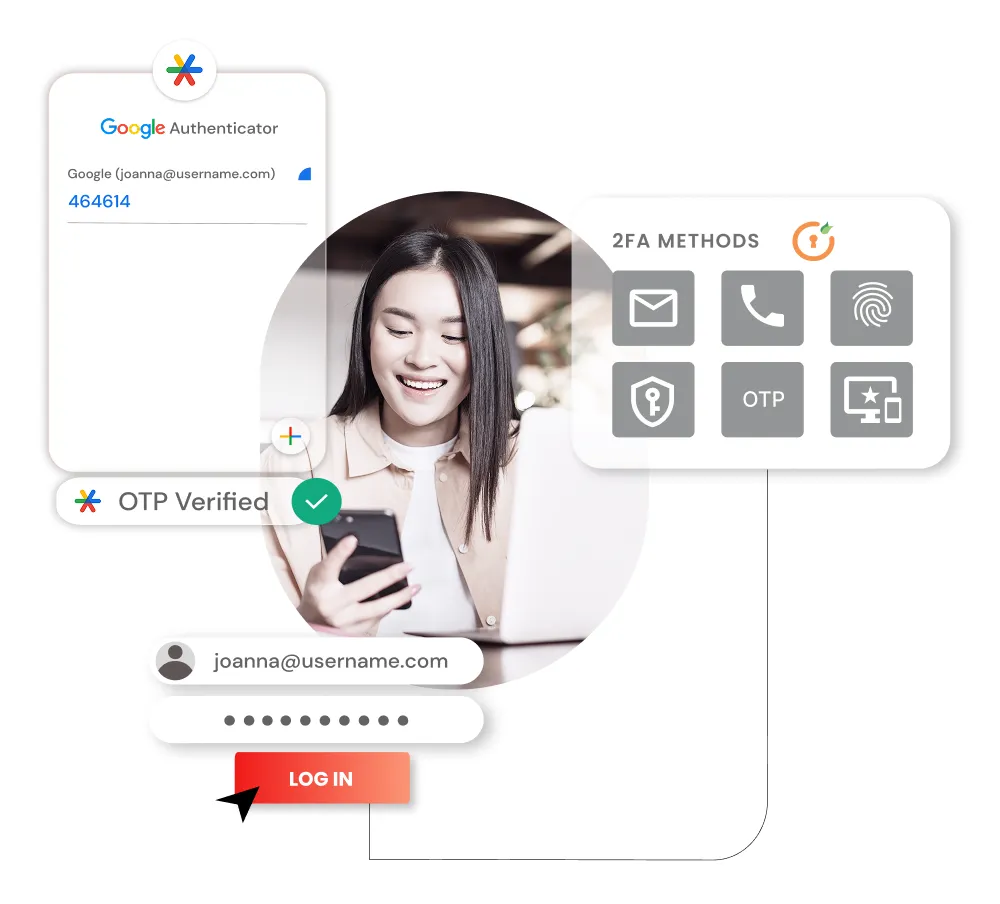
Conceptual graphic depicting two-factor authentication methods including Google Authenticator and OTP verification for enhanced WordPress security
Setting up 2FA is surprisingly straightforward:
- Install a reputable 2FA plugin like Two Factor Authentication or use your security plugin’s built-in 2FA
- Download an authenticator app (Google Authenticator, Authy, or Microsoft Authenticator)
- Scan the QR code provided by the plugin
- Test the setup by logging out and back in
For WordPress.com sites, 2FA is enforced by default for Administrator and Editor roles, but self-hosted sites require manual setup.
Critical Priority #2: Implement a Web Application Firewall (WAF)
A quality WAF acts as your site’s first line of defense, filtering malicious traffic before it reaches your WordPress installation. Modern WAFs can:
- Block 99.8% of attack attempts through AI-powered threat detection
- Prevent DDoS attacks that could overwhelm your server
- Stop brute force attempts before they impact performance
- Filter out malicious bots automatically
Illustration showing cloud backup security with secure login and data protection symbols alongside a security officer figure
WAF Options for 2025:
- Cloudflare: Free tier available with basic protection
- Wordfence: Integrated plugin solution with real-time updates
- Sucuri: Comprehensive security service with cleanup guarantees
- Host-level firewalls: Many hosting providers now include WAF protection
Critical Priority #3: Automate Your Backup Strategy
Regular backups have a 90% effectiveness rating but only 49% adoption rate—one of the most critical gaps in WordPress security. In 2025, manual backups are no longer sufficient; you need automated, tested, and geographically distributed backup solutions.

Illustration of cloud maintenance and website security with gears, tools, and security icons showing cloud infrastructure management
Best Backup Practices for 2025:
- Daily automated backups with at least 30-day retention
- Off-site storage (never rely solely on your hosting provider)
- Regular restoration testing to ensure backups actually work
- Incremental backups to minimize server resources and storage costs
- Database and file backups as separate, recoverable components
Top backup solutions include:
- UpdraftPlus: 3+ million active installs with extensive cloud storage options
- BlogVault: Real-time backups with staging environments
- JetBackup: Performance-optimized with compression features
High Priority: SSL Certificate Implementation
While 78% of sites now use SSL certificates, many implementations are incomplete, leaving security gaps. In 2025, proper HTTPS implementation involves:
Browser showing a valid SSL certificate with a secure connection padlock for certum.eu website
- Obtaining a certificate (Let’s Encrypt offers free options)
- Configuring WordPress to use HTTPS in all URLs
- Setting up 301 redirects from HTTP to HTTPS
- Fixing mixed content issues that can break the security chain
- Updating all internal links to use HTTPS
Pro tip: Use plugins like Really Simple SSL to automate the transition, but monitor performance impact carefully.
High Priority: Security Plugin Selection
With 71% adoption rates, security plugins are widely used, but not all are created equal. The key is choosing comprehensive solutions rather than multiple single-purpose plugins that can conflict with each other.
Top WordPress Security Plugins for 2025:
- Wordfence Security: Real-time threat intelligence with extensive firewall features
- Solid Security: Comprehensive protection with detailed reporting
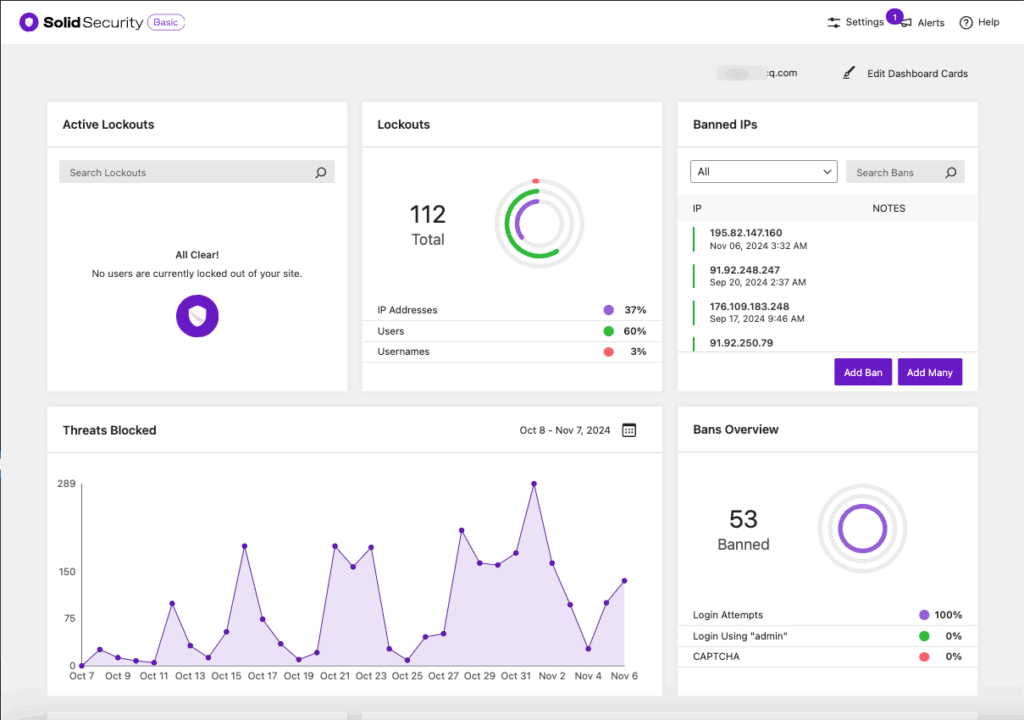
WordPress security plugin dashboard showing active lockouts, banned IPs, blocked threats, and ban overview with charts and graphs for real-time security monitoring
- Shield Security: AI-powered protection with user-friendly interface
- MalCare: Automated threat detection with cleanup services


 Start Today With AddWeb
The Security Measures Adoption Gap
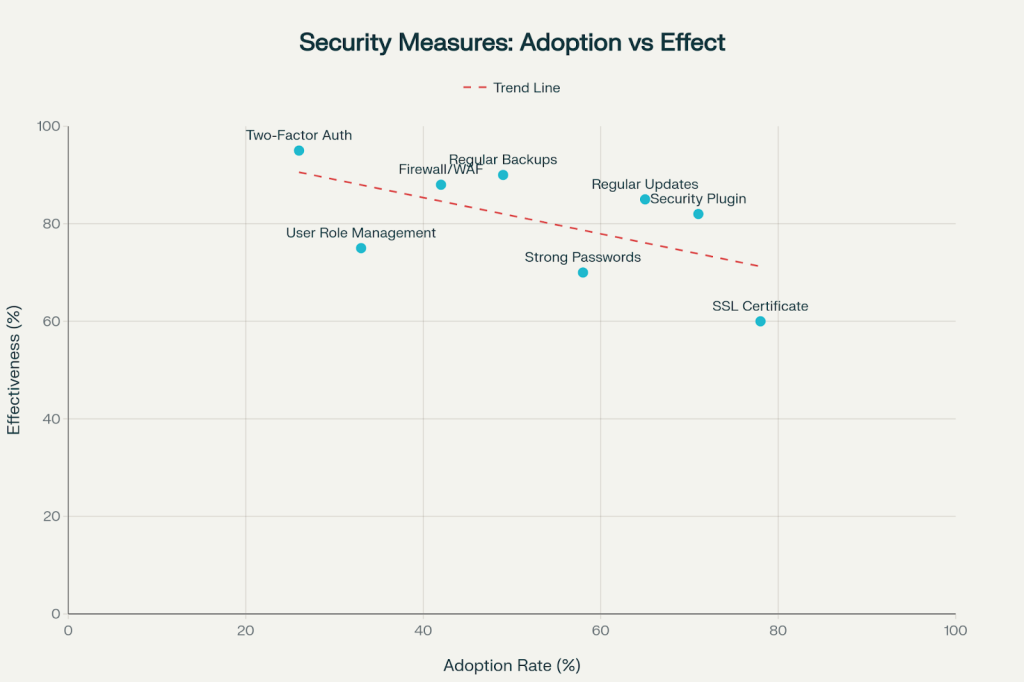
Scatter plot comparing adoption rates and effectiveness of various WordPress security measures, revealing gaps between what’s most effective and what’s most adopted
Our analysis reveals a concerning disconnect between what works and what people actually implement. Two-factor authentication, despite being 95% effective, has only 26% adoption. Meanwhile, SSL certificates have 78% adoption but only 60% effectiveness because many implementations are incomplete.
The Most Effective Yet Underutilized Measures:
- Two-Factor Authentication: 95% effective, 26% adoption
- Regular Backups: 90% effective, 49% adoption
- Firewall/WAF: 88% effective, 42% adoption
- Database Security: 90% effective, 33% adoption
WordPress Security Best Practices Checklist
Here’s your actionable security checklist for 2025:
Critical Actions (Do These First):
- Enable automatic updates for WordPress core, plugins, and themes
- Implement two-factor authentication for all admin accounts
- Set up automated daily backups with off-site storage
- Install and configure a reputable security plugin
High Priority Actions:
- Install SSL certificate and force HTTPS site-wide
- Implement a Web Application Firewall (WAF)
- Conduct regular malware scans
- Review and optimize user roles and permissions
Medium Priority Actions:
- Limit login attempts to prevent brute force attacks
- Secure file permissions and database access
- Remove unused plugins and themes regularly
- Monitor user activity and system logs
Emerging Threats to Watch in 2025
Supply Chain Attacks
Attackers are increasingly targeting the WordPress ecosystem’s supply chain—compromising plugin developers, theme marketplaces, and hosting providers to distribute malicious code at scale. This means even security-conscious users can be compromised through trusted sources.
Ransomware-as-a-Service
Ransomware attacks have grown exponentially, with organized criminal groups now offering “ransomware-as-a-service” to less technical attackers. WordPress sites are attractive targets because they often contain valuable business data and customer information.
Zero-Day Exploit Trading
The market for zero-day exploits (previously unknown vulnerabilities) has become more sophisticated, with attackers purchasing exclusive access to vulnerabilities before patches are available.
The Future of WordPress Security
Looking ahead, the EU’s Cyber Resilience Act will take effect in 2026, legally requiring plugin developers to maintain security standards similar to GDPR compliance. This should significantly improve the ecosystem’s overall security posture.
Key trends shaping WordPress security:
- AI-powered defense systems that can adapt to new threats in real-time
- Automated vulnerability management with instant patching capabilities
- Behavior-based threat detection that identifies attacks based on patterns rather than signatures
- Enhanced developer accountability through legal frameworks and certification programs
Your Action Plan for 2025
WordPress security in 2025 isn’t just about installing a plugin and hoping for the best—it requires a proactive, multi-layered approach. The threats are real, sophisticated, and growing, but they’re not insurmountable.
Start with these immediate actions:
- Audit your current security posture using the checklist above
- Implement the three critical priorities: 2FA, WAF, and automated backups
- Subscribe to security newsletters from Wordfence, Patchstack, and WPScan for threat intelligence
- Schedule monthly security reviews to ensure your defenses stay current
- Create an incident response plan before you need it
Remember, security is not a destination—it’s a journey. The attackers aren’t taking breaks, and neither can your vigilance. But with the right tools, knowledge, and mindset, you can keep your WordPress site secure, your visitors safe, and your business protected.
The question isn’t whether your site will be targeted—it’s whether you’ll be ready when it happens. Start building your defenses today, because in the world of WordPress security, being prepared isn’t just smart—it’s essential for survival.
What security measures will you implement first? The clock is ticking, and your site’s security depends on the actions you take today.
Source URLs:
- https://wordpress.org/plugins/wordfence/
- https://www.youtube.com/watch?v=MAizwJYC6kY
- https://kinsta.com/blog/web-development-trends/
- https://wordpress.com/plugins/two-factor-authentication
- https://www.wordfence.com/help/firewall/
- https://wordpress.com/support/security/two-step-authentication/
- https://developer.wordpress.org/advanced-administration/security/https/
- https://wordpress.com/blog/2025/06/30/wordpress-backup-plugins/
About the Author: Mahima Dave is a Client Account Manager at AddWeb with 5+ years of experience in WordPress and client relationship management. She has been actively involved in the WordPress community through contributions and events, while also excelling at building strong client connections, ensuring seamless communication, and driving project success.