
Contact forms are the digital bridge between your business and potential customers. In today’s competitive online landscape, having a robust, user-friendly contact form isn’t just nice to have; it’s essential for converting visitors into leads and building meaningful customer relationships. With over 45% of businesses identifying web forms as their primary source of high-converting leads, choosing the right WordPress contact form plugin can significantly impact your bottom line.
In this comprehensive guide, we’ll explore the 12 best WordPress contact form plugins that are dominating the business landscape in 2025, complete with detailed comparisons, pricing insights, and performance analytics to help you make an informed decision.

Drag-and-drop interface of WPForms WordPress contact form builder showing customizable fields being added to a website contact form
Why Your Business Needs a Professional Contact Form Plugin
Before diving into our top picks, let’s understand why investing in a quality contact form plugin is crucial for business success:
- Enhanced Lead Generation: Modern contact forms don’t just collect information—they nurture prospects through strategic design and smart integrations
- Improved User Experience: Seamless, mobile-responsive forms reduce friction and increase conversion rates
- Robust Spam Prevention: Advanced security features protect your inbox from malicious attacks while ensuring legitimate inquiries reach you
- Streamlined Workflow Automation: Smart routing, auto-responses, and CRM integrations save time and improve professionalism
- GDPR Compliance: Built-in privacy features ensure your forms meet international data protection standards
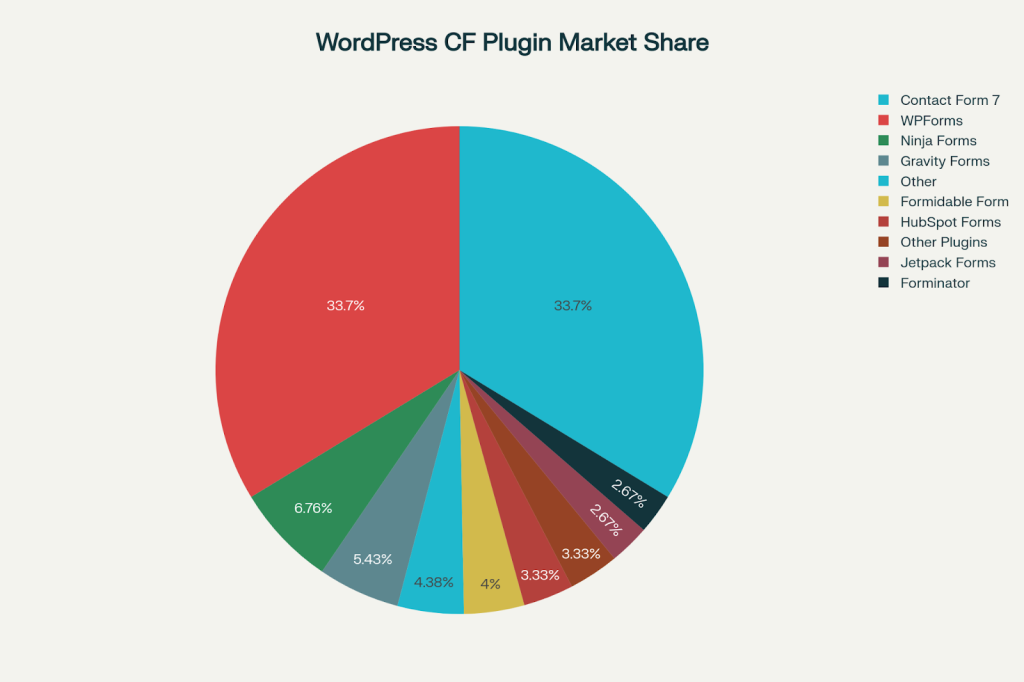
Market Share Distribution of Top WordPress Contact Form Plugins in 2025
Market Leadership Analysis: The Current Landscape
The WordPress contact form plugin market is dominated by two clear leaders, with several strong contenders vying for market share. Our analysis reveals that Contact Form 7 and WPForms each command 35.4% of the market, making them the undisputed champions in terms of adoption. However, market share doesn’t always equal the best choice for your specific business needs.
The 12 Best WordPress Contact Form Plugins for 2025
1. WPForms – The Business Favorite
Rating: 4.9/5 | Starting Price: $49.50/year | Free Version: Yes
WPForms has earned its reputation as the most beginner-friendly and business-focused contact form plugin available. With over 5 million active installations and a near-perfect rating, it’s become the go-to choice for businesses serious about lead generation.
The plugin’s AI-powered form builder can automatically create comprehensive forms through natural conversation, while its 2,000+ pre-built templates cover every conceivable business need from simple contact forms to complex multi-step applications. What sets WPForms apart is its business workflow automation capabilities, allowing automatic data routing to CRM systems like Salesforce and HubSpot, instant follow-up emails, and lead recovery through form abandonment technology.
Key Features:
- 2,000+ pre-built templates covering every business need
- Drag-and-drop builder that requires zero coding knowledge
- Smart conditional logic for dynamic form behavior
- Payment integrations with Stripe, PayPal, and Square
- Advanced spam protection with multiple security layers
- Comprehensive integrations with 400+ marketing and CRM tools
Best For: Small to medium businesses, entrepreneurs, and anyone prioritizing ease of use with professional features
Performance Impact: Only 80ms load time with smart asset loading
2. Gravity Forms – The Developer’s Choice
Rating: 4.5/5 | Starting Price: $59/year | Free Version: No
Gravity Forms stands out as the most powerful and customizable contact form solution, despite being premium-only. It’s designed for users who need advanced functionality and aren’t afraid of a steeper learning curve.
Gravity Forms excels in complex business scenarios with its 30+ advanced form fields including signature capture, file uploads, and calculations that update in real-time. The plugin’s extensive add-on ecosystem features over 50 official integrations and hundreds of third-party extensions, making it incredibly versatile for enterprise needs. Its predictable pricing structure remains consistent year after year, unlike competitors that spike prices after the first year.
Key Features:
- 30+ form fields for complex form creation
- Advanced conditional logic with multiple rule sets
- User-submitted content forms for directory sites
- Quiz and survey capabilities with scoring
- Calculation fields for dynamic pricing forms
- Save and continue functionality for long forms
Best For: Developers, agencies, and businesses requiring complex form workflows
Performance Impact: 110ms load time with form-specific loading
3. Formidable Forms – The Application Builder
Rating: 4.7/5 | Starting Price: $39.50/year | Free Version: Yes
Formidable Forms goes beyond traditional contact forms, offering the ability to create form-driven applications like directories, calculators, and job boards.
Formidable Forms transforms WordPress into a powerful database application with its unique Views feature that displays form entries on the frontend, essentially turning submissions into dynamic content. The plugin’s advanced calculation system supports complex mathematical operations, making it perfect for quote generators, ROI calculators, and pricing tools. Its directory and listing functionality allows businesses to create member directories, real estate listings, or product catalogs directly from form submissions.
Key Features:
- Views for displaying entries on the frontend
- Advanced calculators and pricing forms
- Directory and listing functionality
- WooCommerce integration for product forms
- User registration and profile management
- Repeater fields for dynamic content
Best For: Developers and agencies building complex, data-driven websites
Performance Impact: 120ms load time but offers extensive functionality

Take Control of Your Leads – Install the Right Plugin Today!

Pooja Upadhyay
Director Of People Operations &
Client Relations
4. HubSpot Forms – The All-in-One Solution
Rating: 4.4/5 | Starting Price: Free | Free Version: Yes
HubSpot Forms isn’t just a contact form plugin—it’s part of a comprehensive marketing ecosystem that includes CRM, email marketing, and analytics tools.
HubSpot’s integrated approach eliminates the need for multiple tools by providing built-in CRM functionality with automatic contact management, lead scoring, and deal tracking. The platform’s progressive profiling feature reduces form friction by gradually collecting additional information from returning visitors, improving conversion rates over time. Marketing automation sequences can be triggered directly from form submissions, nurturing leads through personalized email campaigns.
Key Features:
- Built-in CRM with automatic contact management
- Email marketing automation sequences
- Live chat and chatbot functionality
- Advanced analytics and reporting
- Progressive profiling to reduce form friction
- Smart content personalization
Best For: Small businesses wanting an integrated marketing solution without additional tool costs
Performance Impact: 90ms load time with CRM functionality
5. Ninja Forms – The Modular Approach
Rating: 4.4/5 | Starting Price: $99/year | Free Version: Yes
Ninja Forms takes a modular approach, allowing you to add functionality through specific add-ons as your needs grow.
Ninja Forms’ modular architecture allows businesses to start simple and scale by adding only the features they need through its 40+ specialized add-ons. The plugin’s multi-part form capabilities include progress indicators and save-and-resume functionality, perfect for complex applications and surveys. Front-end posting features enable user-generated content creation, while Zapier integration provides access to over 3,000 third-party applications for workflow automation. Advanced styling options give designers complete control over form appearance without coding.
Key Features:
- 40+ add-ons for extended functionality
- Multi-part forms with progress indicators
- Front-end posting capabilities
- Zapier integration for unlimited automation
- Layout and styling options
- Conditional logic in premium version
Best For: Businesses wanting to start simple and scale features over time
Performance Impact: 95ms load time with selective loading
6. Contact Form 7 – The Veteran
Rating: 4.1/5 | Starting Price: Free | Free Version: Yes
Despite being one of the oldest contact form plugins, Contact Form 7 remains incredibly popular with 5+ million active installations.
Contact Form 7’s enduring popularity stems from its completely free nature with no premium upsells, making it attractive for budget-conscious users. The plugin’s lightweight core focuses on basic functionality, while an extensive ecosystem of third-party add-ons provides additional features as needed. Multi-language support and Akismet spam filtering integration make it suitable for international websites. However, the plugin requires technical knowledge for advanced features, and its performance impact can be significant due to loading scripts on all pages regardless of form presence.
Key Features:
- Completely free with no premium upsells
- Lightweight core for basic functionality
- Extensive third-party add-ons available
- AJAX form submission (requires setup)
- Multi-language support
- Akismet spam filtering integration
Best For: Budget-conscious users comfortable with technical setup
Performance Issues: 150ms load time due to loading scripts on all pages
7. Forminator – The Feature-Rich Free Option
Rating: 4.8/5 | Starting Price: Free | Free Version: Yes
Developed by WPMU DEV, Forminator offers premium-level features in a completely free package.
Forminator’s exceptional value proposition includes block editor integration that works seamlessly with WordPress’s Gutenberg editor for modern website building. The plugin features calculated fields for dynamic pricing and quote forms, plus live statistics with charts and graphs for real-time form analytics. Payment integration with both Stripe and PayPal comes standard, even in the free version. Front-end post submission capabilities allow user-generated content creation, while advanced styling options provide design flexibility typically found in premium plugins.
Key Features:
- Block editor integration for seamless WordPress experience
- Calculated fields for dynamic forms
- Live statistics with charts and graphs
- Stripe and PayPal payment integration
- Front-end post submission
- Advanced styling options
Best For: Users wanting advanced features without premium costs
Performance Impact: 100ms load time with modern optimization
8. Everest Forms – The User-Friendly Alternative
Rating: 4.9/5 | Starting Price: $69/year | Free Version: Yes
Everest Forms has gained popularity for its intuitive interface and excellent user experience.
Everest Forms prioritizes user experience with its live preview functionality that shows form changes in real-time during the building process. The plugin offers instant email notifications with customizable templates and multi-step forms even in the free version, a feature typically reserved for premium plugins. Real-time form validation provides immediate feedback to users, reducing form abandonment and improving data quality. Import/export functionality allows easy form migration between websites, while the translation-ready interface supports multilingual websites out of the box.
Key Features:
- Live preview while building forms
- Instant email notifications
- Multi-step forms in free version
- Real-time form validation
- Import/export functionality
- Translation-ready interface
Best For: Users prioritizing simplicity and clean design
Performance Impact: 85ms load time with smart loading
9. Fluent Forms – The Speed Champion
Rating: 4.8/5 | Starting Price: $79/year | Free Version: Yes
Fluent Forms positions itself as the fastest contact form builder, focusing heavily on performance optimization.
Fluent Forms’ performance-first approach delivers industry-leading speed with minimal server resource usage and optimized database queries. The plugin’s AI form building feature can automatically create forms based on natural language descriptions, significantly reducing setup time. Advanced conditional logic supports any/all/group conditions for complex business rules, while user geolocation and address autocomplete enhance user experience. Form version history with undo/redo functionality prevents data loss during form editing.
Key Features:
- AI form building for quick setup
- Advanced conditional logic with any/all/group options
- 1.9% transaction fee for Stripe payments
- User geolocation and address autocomplete
- Form version history with undo/redo
- Landing page builder in premium
Best For: Performance-conscious users and developers
10. HappyForms – The Lightweight Specialist
Rating: 4.5/5 | Starting Price: $79/year | Free Version: Yes
HappyForms focuses on simplicity and performance, making it ideal for straightforward contact form needs.
HappyForms’ minimalist philosophy provides 20+ field types including unique options like signature capture and number sliders, while maintaining a lightweight footprint. The plugin’s one-click styling options allow quick design changes without CSS knowledge, perfect for non-technical users. HoneyPot spam protection works invisibly to prevent spam without user interaction, while Gutenberg-ready blocks integrate seamlessly with modern WordPress workflows. Import/export capabilities facilitate website migrations, and referrer IP tracking provides valuable analytics for lead source identification.
Key Features:
- 20+ field types including signature and slider
- One-click styling options
- HoneyPot spam protection
- Gutenberg-ready blocks
- Import/export forms
- Referrer IP tracking
Best For: Users wanting simple forms with minimal bloat
11. Jetpack Forms – The WordPress.com Integration
Rating: 3.9/5 | Starting Price: Free | Free Version: Yes
Jetpack Forms comes bundled with the popular Jetpack plugin, offering basic form functionality.
Jetpack Forms’ integration advantage comes from being natively built for the block editor, providing seamless WordPress compatibility. The plugin offers multiple form types including feedback forms, newsletter signups, and appointment booking forms. Akismet spam protection is built-in for users with existing Akismet subscriptions, while simple setup requires minimal configuration. However, the plugin’s main drawback is potential bloat from the larger Jetpack suite, which can impact site performance.
Key Features:
- Block editor native integration
- Multiple form types (feedback, newsletter, appointment)
- Akismet spam protection
- Email notifications
- Simple setup process
Best For: Existing Jetpack users needing basic forms
Drawback: Can add bloat to your website
12. Quform – The Theme-Focused Solution
Rating: 4.2/5 | Starting Price: $29 one-time | Free Version: No
Quform excels at visual customization and theming, offering 11 built-in themes for quick styling.
Quform’s design-centric approach features 11 pre-designed themes that can be applied instantly for professional-looking forms without custom CSS. The plugin includes 19 element types for comprehensive form building, while live preview functionality with responsive testing ensures forms look perfect on all devices. One-time payment model makes it cost-effective for long-term use compared to annual subscriptions. Conditional logic capabilities enable dynamic form behavior, while autocomplete features improve user experience by pre-filling common fields. The plugin’s theming system allows for consistent branding across multiple forms and websites.
Key Features:
- 19 element types for form building
- 11 pre-designed themes
- Live preview with responsive testing
- One-time payment model
- Conditional logic functionality
- Autocomplete features
Best For: Design-focused users wanting themed forms
Comparative Analysis
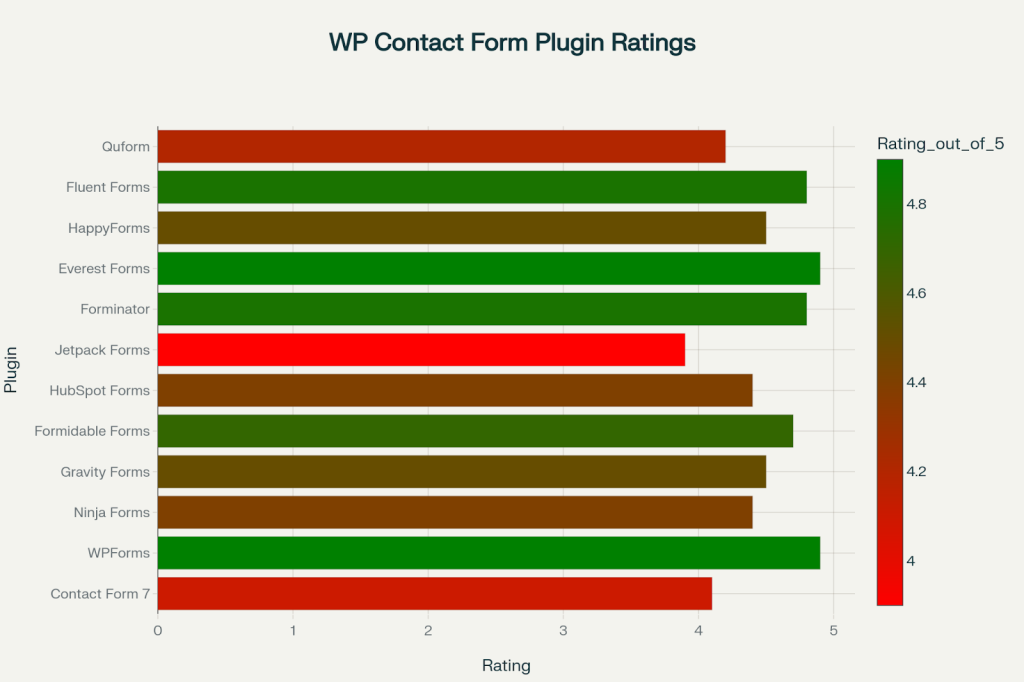
User Ratings Comparison of WordPress Contact Form Plugins (Out of 5 Stars)
User Ratings and Satisfaction
The user ratings reveal interesting insights about plugin quality and user satisfaction. Everest Forms and WPForms lead with 4.9/5 stars, while Forminator and Fluent Forms follow closely at 4.8/5. Notably, Jetpack Forms has the lowest rating at 3.9/5, primarily due to concerns about plugin bloat.
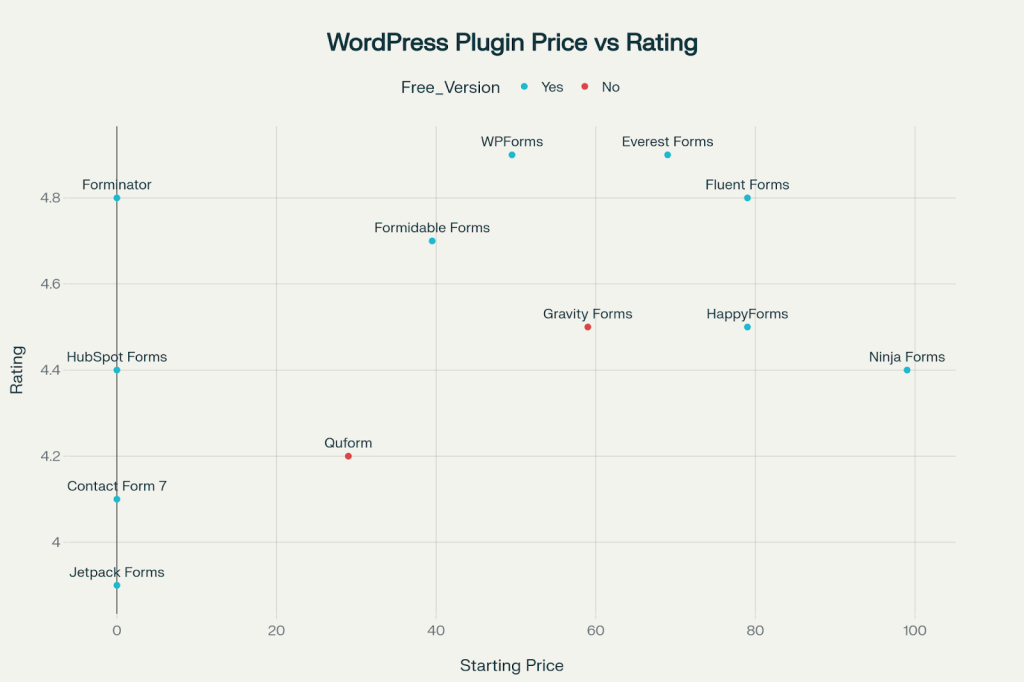
Price vs Rating Analysis for WordPress Contact Form Plugins
Price vs. Value Analysis
Our pricing analysis shows that free doesn’t always mean better value. While plugins like Contact Form 7, HubSpot Forms, and Forminator offer zero-cost entry points, premium plugins like WPForms and Formidable Forms provide significantly more features and support for their price points.

Feature Comparison Matrix for Top WordPress Contact Form Plugins
Feature Comparison Matrix
The feature matrix reveals that Contact Form 7 significantly lags behind modern alternatives, lacking essential business features like drag-and-drop builders, pre-built templates, and conditional logic. WPForms, Gravity Forms, and Formidable Forms offer the most comprehensive feature sets.

Performance Impact Comparison of WordPress Contact Form Plugins (Load Time in ms)


 Level Up With AddWeb
Performance Impact Comparison
Performance is crucial for business websites. WPForms leads with the lowest impact at 80ms, followed by Everest Forms at 85ms. Contact Form 7 performs worst at 150ms due to loading scripts on all pages, regardless of form presence.
Key Features to Look for in 2025
Essential Business Features
- Drag-and-Drop Builder: Non-technical users need visual form creation
- Pre-Built Templates: Speed up deployment with professional designs
- Mobile Responsiveness: Over 60% of form submissions happen on mobile
- Spam Protection: Multiple layers including reCAPTCHA and HoneyPot
- Email Marketing Integration: Connect with MailChimp, Constant Contact, etc.
Advanced Functionality
- Conditional Logic: Show/hide fields based on user responses
- Multi-Page Forms: Improve completion rates for complex forms
- Payment Processing: Accept payments directly through forms
- File Uploads: Allow document submissions and attachments
- Analytics Integration: Track form performance and conversion rates
Compliance and Security
- GDPR Compliance: Essential for international business
- SSL Encryption: Secure data transmission
- Data Retention Controls: Automatic cleanup of old submissions
- Privacy Field Options: Consent checkboxes and privacy agreements
Performance Optimization Tips
Speed Optimization
- Choose Smart Loading: Plugins like WPForms only load assets when needed
- Avoid Contact Form 7: Its all-page loading significantly impacts performance
- Enable AJAX: Prevent full-page reloads during form submission
- Optimize Images: Compress any images used in form design
- Use Caching: Implement page caching for faster load times
Conversion Optimization
- Minimize Fields: Each additional field reduces conversion by 5-10%
- Use Progress Indicators: Show completion progress in multi-step forms
- Optimize Button Text: Action-oriented text performs better than generic “Submit”
- Mobile-First Design: Ensure forms work perfectly on small screens
- A/B Testing: Test different form variations to improve performance
Making the Right Choice for Your Business
For Small Businesses
Recommendation: WPForms – Offers the perfect balance of features, ease of use, and business-focused functionality.
For Developers and Agencies
Recommendation: Formidable Forms or Gravity Forms – Provide advanced customization and complex functionality.
For Budget-Conscious Users
Recommendation: Forminator or HubSpot Forms – Offer premium features without premium pricing.
For E-commerce Sites
Recommendation: WPForms or Gravity Forms – Both offer robust payment processing and WooCommerce integration.
For Performance-Critical Sites
Recommendation: Fluent Forms or WPForms – Optimized for speed with minimal performance impact.

Example of a responsive contact us form displayed on desktop and mobile devices to illustrate user-friendly design
Future Trends in Contact Form Technology
As we move through 2025, several trends are shaping the contact form landscape:
- AI-Powered Form Building: Automated form creation based on business needs
- Conversational Forms: Chat-like interfaces for better user engagement
- Progressive Profiling: Gradual data collection to reduce form abandonment
- Advanced Analytics: Deeper insights into form performance and user behavior
- Voice Input: Integration with voice recognition for accessibility
Implementation Best Practices
Setup and Configuration
- Start with Templates: Use pre-built forms and customize as needed
- Configure Notifications: Set up proper email routing and auto-responses
- Enable Spam Protection: Implement multiple security layers
- Test Thoroughly: Check forms on various devices and browsers
- Monitor Performance: Track form analytics and conversion rates
GDPR Compliance Checklist
✅ Enable GDPR enhancements in plugin settings
✅ Add consent checkboxes for data collection
✅ Include privacy policy links in forms
✅ Configure data retention policies
✅ Provide data export/deletion options
Security Best Practices
- Regular Updates: Keep plugins and WordPress core updated
- Strong Passwords: Use complex passwords for admin accounts
- SSL Certificates: Encrypt all data transmission
- Regular Backups: Maintain current backups of your website
- Monitor Submissions: Watch for suspicious activity patterns
Conclusion
Choosing the right WordPress contact form plugin is a strategic business decision that impacts lead generation, user experience, and overall website performance. While Contact Form 7 and WPForms dominate the market, your specific needs should guide your choice.
For most businesses in 2025, WPForms offers the ideal combination of user-friendliness, powerful features, and business-focused functionality. Its 4.9/5 rating, extensive template library, and smart performance optimization make it the top choice for serious businesses.
However, developers requiring advanced customization might prefer Gravity Forms or Formidable Forms, while budget-conscious users should consider Forminator or HubSpot Forms for their free premium features.
Remember, the best contact form plugin is the one that converts visitors into customers while providing an excellent user experience. Choose wisely, implement properly, and watch your lead generation soar in 2025.
Ready to transform your website’s lead generation? Start with our top recommendation, WPForms, and experience the difference a professional contact form solution can make for your business success.
- https://www.wappalyzer.com/technologies/wordpress-plugins/
- https://wpforms.com/features/
- https://kinsta.com/blog/wordpress-contact-form-plugins/
- https://wpforms.com/categories/integrations/marketing/
- https://wpforms.com/creative-wpforms-ideas-to-grow-your-business/
- https://wordpress.org/plugins/wpforms-lite/
About the Author: Mahima Dave is a Client Account Manager at AddWeb with 5+ years of experience in WordPress and client relationship management. She has been actively involved in the WordPress community through contributions and events, while also excelling at building strong client connections, ensuring seamless communication, and driving project success.