The internet isn’t as “virtual” as you might think. Every click, scroll, and page load contributes to a massive digital carbon footprint that rivals the aviation industry. With WordPress powering over 40% of all websites globally, the platform plays a crucial role in either accelerating or mitigating our environmental crisis.
Here’s the eye-opening reality: the average website produces 1.76 grams of CO2 per page view. For a site with 10,000 monthly visitors, that’s 211 kilograms of CO2 annually – equivalent to what 105 trees absorb in a year. But here’s the good news: building sustainable WordPress websites isn’t just environmentally responsible – it’s also better for business, SEO, and user experience.

Infographic showing the internet’s large energy use due to hardware manufacturing and powering devices, alongside carbon footprints of search engines, web browsing, servers, and emails
The Hidden Environmental Cost of Your WordPress Site
Understanding Digital Emissions
The internet currently accounts for 3.7% of global greenhouse gas emissions, making it a bigger polluter than many countries. This digital footprint stems from three main sources:
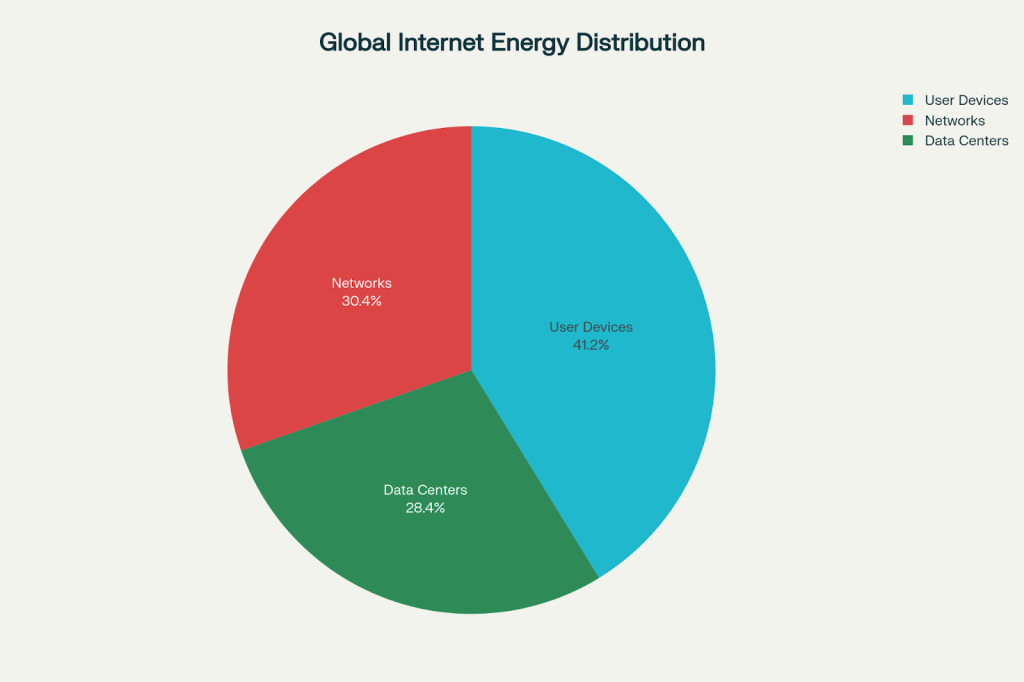
Distribution of global internet energy consumption showing that user devices consume the most energy at 41.2%, followed by networks at 30.4% and data centers at 28.4
User devices consume the largest portion at 41.2% of total internet energy, followed by networks at 30.4% and data centers at 28.4%. What’s particularly concerning is that data centers are projected to consume 6% of the UK’s total electricity by 2030.
WordPress-Specific Impact
WordPress websites face unique sustainability challenges due to their dynamic nature. Unlike static sites, WordPress requires:
- Database queries for every page load
- Plugin processing that can dramatically increase server load
- Theme complexity that often includes unnecessary bloat
- Media-heavy content that increases data transfer
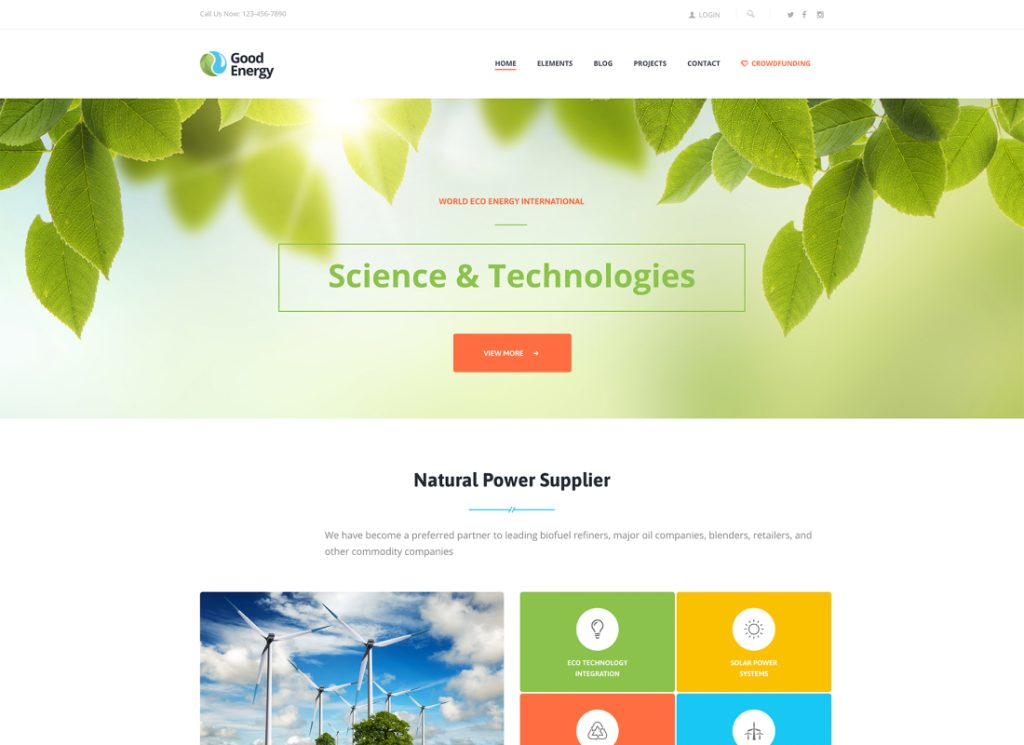
An eco-friendly WordPress theme homepage focused on green energy and sustainability with natural imagery and clean design
The Business Case for Green WordPress Development
Performance Equals Profit
Sustainable websites are fast websites. When you optimize for environmental impact, you simultaneously improve:
- Page load speeds by up to 65%
- SEO rankings through better Core Web Vitals
- User experience with 55% improvement in satisfaction
- Conversion rates due to reduced bounce rates

Make Your Website Faster & Greener.

Pooja Upadhyay
Director Of People Operations &
Client Relations
Meeting Consumer Expectations
Today’s consumers increasingly choose brands based on environmental values. A green website signals your commitment to sustainability, helping you:
- Attract eco-conscious customers
- Improve brand reputation and trust
- Differentiate from competitors who ignore sustainability
- Prepare for upcoming environmental regulations
Essential WordPress Sustainability Strategies
1. Choose Green Hosting That Actually Works
Not all “green” hosting is created equal. Look for providers that offer:
Renewable Energy Certification: Verified by organizations like The Green Web Foundation
Energy-Efficient Infrastructure: Advanced cooling systems and optimized hardware
Carbon Offsetting Programs: Tree planting and environmental projects
Performance Optimization: CDN integration and server efficiency
Top verified green hosting providers include:
- GreenGeeks – 300% renewable energy match
- Kinsta – Google Cloud Platform’s carbon-neutral infrastructure
- SiteGround – Renewable energy data centers
2. Master WordPress Optimization Techniques
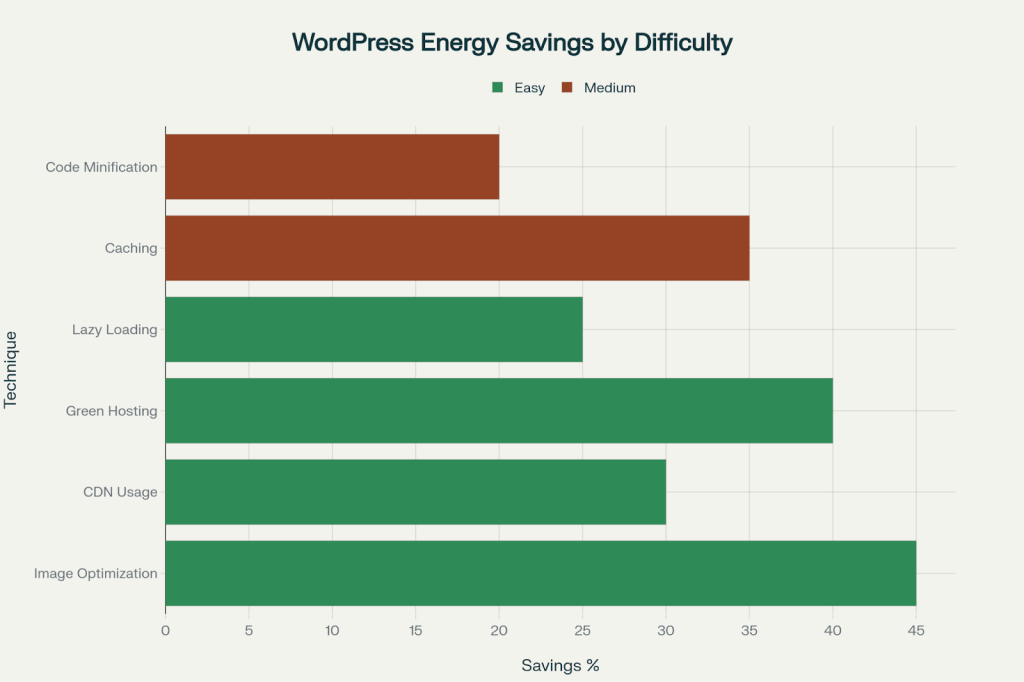
WordPress optimization techniques ranked by energy savings potential, with implementation difficulty levels shown through color coding
The chart above shows the most effective optimization strategies. Here’s how to implement them:
Image Optimization (45% energy savings):
- Use WebP format instead of JPEG/PNG for 25-35% smaller file sizes
- Implement lazy loading so images only load when visible
- Compress images with tools like TinyPNG or WP Smush
- Set appropriate image dimensions – don’t use CSS to resize large images
Caching Implementation (35% savings):
- Install WP Rocket or similar caching plugins
- Enable browser caching for returning visitors
- Use server-level caching when available
- Implement object caching for database-heavy sites
Content Delivery Networks (30% savings):
- Distribute content globally to reduce data travel distance
- Choose CDNs powered by renewable energy
- Enable automatic image optimization through CDN services
3. Select Lightweight, Sustainable Themes
Theme choice dramatically impacts your site’s environmental footprint. Sustainable WordPress themes feature:
Minimal Code Bloat: Clean, efficient coding that reduces server processing
System Font Usage: Avoiding custom web fonts saves HTTP requests
Responsive Design: One theme that works across all devices
Limited Plugin Dependencies: Fewer plugins mean less resource consumption
Recommended eco-friendly themes:
- GeneratePress – Lightweight and highly optimized
- Susty – Specifically designed for minimal environmental impact
- Astra – Fast-loading with sustainable coding practices
4. Optimize Content for Sustainability
Strategic content decisions significantly reduce environmental impact:
Video Optimization:
- Avoid autoplay videos which can increase page load by 300%
- Use efficient video formats like H.264 or VP9
- Implement video lazy loading
- Consider thumbnail previews instead of full video embeds
Content Strategy:
- Write concise, valuable content that reduces time on page
- Use bullet points and lists for faster scanning
- Implement clear navigation to reduce user search time
- Remove outdated content and unnecessary pages
5. Leverage Green Plugins and Tools
Essential sustainability plugins for WordPress:
| Plugin | Function | Environmental Impact |
| WP Rocket | Caching and optimization | 35% energy reduction |
| Kanoppi | Carbon footprint tracking | Real-time emissions monitoring |
| Asset CleanUp | Removes unused code | 30% page size reduction |
| Imagify | Image compression | 45% bandwidth savings |
| Query Monitor | Performance debugging | Identifies energy-wasting processes |
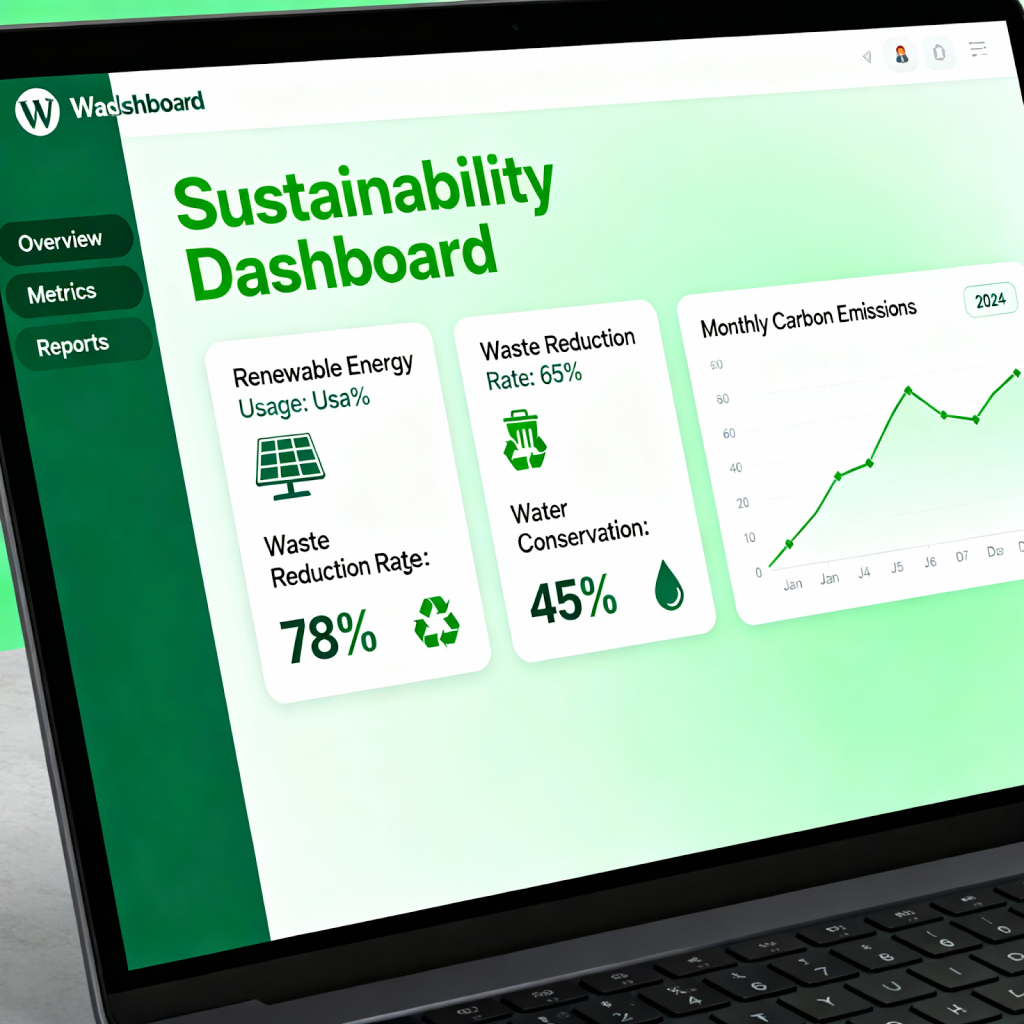
Eco-friendly WordPress dashboard displaying sustainability metrics and green optimization features
Measuring Your WordPress Site’s Environmental Impact
Essential Sustainability Metrics
Track these key performance indicators:
- Carbon emissions per page view (target: under 1g CO2)
- Page load speed (target: under 2 seconds)
- Total page weight (target: under 1MB)
- Energy consumption per visit
- Green hosting verification status
Recommended Measurement Tools
Free Assessment Tools:
- Website Carbon Calculator – Measures CO2 per page view
- Ecograder – Comprehensive sustainability scoring
- GTmetrix – Performance and environmental impact analysis
- Google PageSpeed Insights – Core Web Vitals tracking
Advanced Monitoring:
- Kanoppi WordPress Plugin – Dashboard-integrated tracking
- Digital Beacon – First vs. repeat visitor impact analysis
- Green Web Check – Hosting verification
WordPress Sustainability Action Plan
Phase 1: Foundation (Week 1-2)
- Audit current environmental impact using measurement tools
- Switch to verified green hosting provider
- Install essential optimization plugins (caching, image compression)
- Choose a lightweight, sustainable theme
Phase 2: Optimization (Week 3-4)
- Optimize all images and implement lazy loading
- Remove unnecessary plugins and themes
- Minimize CSS and JavaScript files
- Set up CDN with renewable energy provider
Phase 3: Content Strategy (Week 5-6)
- Audit and optimize video content
- Streamline navigation and site structure
- Remove outdated or duplicate content
- Implement sustainable content creation guidelines
Phase 4: Monitoring (Ongoing)
- Set up regular performance monitoring
- Track carbon footprint monthly
- Optimize based on data insights
- Share sustainability achievements with users
The SEO Benefits of Sustainable WordPress Development
Google Loves Green Websites
Sustainable practices directly improve SEO performance:
Page Speed Optimization: Google’s Core Web Vitals heavily weight loading speed
Mobile Responsiveness: Eco-friendly themes are typically mobile-optimized
User Experience Signals: Faster sites have lower bounce rates and higher engagement
Technical SEO: Clean, efficient code improves crawlability
Sustainable SEO Strategies
Long-term SEO success requires sustainable practices:
- Quality over quantity content creation
- Regular performance audits and optimization
- Sustainable link building through valuable content
- Green hosting can indirectly boost search rankings
Advanced WordPress Sustainability Techniques
Code-Level Optimization
For developers and advanced users:
Database Optimization:
- Regular database cleanup to remove spam and revisions
- Optimize database tables monthly
- Use efficient database queries
- Implement database caching
Server Configuration:
- Enable Gzip compression for 60-70% file size reduction
- Configure HTTP/2 for faster data transfer
- Implement server-level caching
- Use PHP 8.0+ for better performance
Third-Party Integration Management
Reduce external dependencies:
- Audit all third-party scripts (analytics, chat widgets, social plugins)
- Self-host Google Fonts instead of loading from CDN
- Minimize social media embeds and use static images with links
- Choose green-hosted third-party services when possible


 Level Up With AddWeb
Common WordPress Sustainability Mistakes to Avoid
Theme and Plugin Pitfalls
Expensive mistakes that hurt both performance and the environment:
- Using bloated multipurpose themes with unused features
- Installing too many plugins “just in case”
- Keeping deactivated plugins installed
- Using heavy page builders unnecessarily
Content Management Errors
- Uploading images directly from cameras without compression
- Using plugins for simple CSS tasks
- Autoplay videos and animations
- Excessive use of widgets and sidebar content
Hosting and Infrastructure Issues
- Choosing cheap hosting without considering efficiency
- Ignoring server location relative to audience
- Not utilizing CDN services
- Failing to verify green energy claims
The Future of WordPress Sustainability
Emerging Trends and Technologies
The WordPress ecosystem is rapidly evolving toward sustainability:
Core WordPress Improvements: The WordPress.org team is actively working on sustainability initiatives
AI-Powered Optimization: Automatic image compression and code optimization
Carbon-Aware Computing: Scheduling resource-intensive tasks during low-carbon electricity periods
Improved Hosting Standards: More providers offering genuine renewable energy
Preparing for Environmental Regulations
Businesses should prepare for upcoming sustainability requirements:
- Carbon footprint reporting may become mandatory
- Environmental compliance could affect search rankings
- Consumer pressure for transparency will increase
- Supply chain sustainability audits may include digital assets
Making Sustainability Accessible for Everyone
For Non-Technical Users
You don’t need coding skills to make a difference:
- Choose green hosting providers from verified lists
- Select lightweight themes from sustainable collections
- Use image compression tools before uploading
- Install caching plugins with one-click setup
- Monitor your impact with free measurement tools
For Developers and Agencies
Lead by example and educate clients:
- Include sustainability audits in project proposals
- Recommend green hosting and explain benefits
- Build with performance-first mindset
- Educate clients about sustainable content practices
- Share success stories and environmental impact data
Your Green WordPress Journey Starts Now
Building sustainable WordPress websites isn’t just an environmental imperative – it’s a competitive advantage. Sites that prioritize sustainability consistently outperform their bloated counterparts in speed, SEO rankings, and user satisfaction.
The digital transformation of sustainability is happening now. WordPress site owners who embrace eco-friendly practices today will be better positioned for tomorrow’s regulatory requirements and consumer expectations.
Start with the basics: switch to green hosting, optimize your images, and install a caching plugin. These three changes alone can reduce your site’s carbon footprint by 60-70% while dramatically improving performance.
Remember, every gram of CO2 saved multiplies across millions of page views. Your commitment to WordPress sustainability doesn’t just reduce environmental impact – it creates a faster, more efficient, and more profitable online presence that users and search engines will love.
The future of the web is green, and it starts with your WordPress site. Which optimization will you implement first?
Source URLs:
- https://www.addwebsolution.com/blog/how-to-make-your-wordpress-website-eco-friendly-in-2025
- https://www.thegreenwebfoundation.org/support/why-does-green-hosting-matter/
- https://www.the-public-good.com/web-development/measuring-the-web
- https://wordpress.com/support/courses/seo/seo-tactics-for-long-term-success/
- https://make.wordpress.org/sustainability/
- https://www.footprintnetwork.org/our-work/climate-change/
About the Author: Mahima Dave is a Client Account Manager at AddWeb with 5+ years of experience in WordPress and client relationship management. She has been actively involved in the WordPress community through contributions and events, while also excelling at building strong client connections, ensuring seamless communication, and driving project success.