Creating a multilingual website isn’t just about reaching more people – it’s about connecting with them in their native language. With 76% of internet users preferring to browse and purchase in their own language, WordPress translation plugins have become essential tools for businesses looking to expand globally. In this comprehensive guide, we’ll explore the 9 best WordPress translation plugins that can transform your single-language site into a powerful multilingual platform.
Why Your WordPress Site Needs a Translation Plugin
The numbers tell a compelling story: WordPress powers 43.6% of all websites, and global e-commerce sales are expected to reach $6.38 trillion by 2024. Yet, only 52.1% of web content is in English, leaving a massive audience underserved. Businesses that invest in multilingual websites often see 25-70% increases in sales, making translation plugins not just nice-to-have features, but essential growth tools.
Market Share Analysis: Who’s Leading the Translation Plugin Space
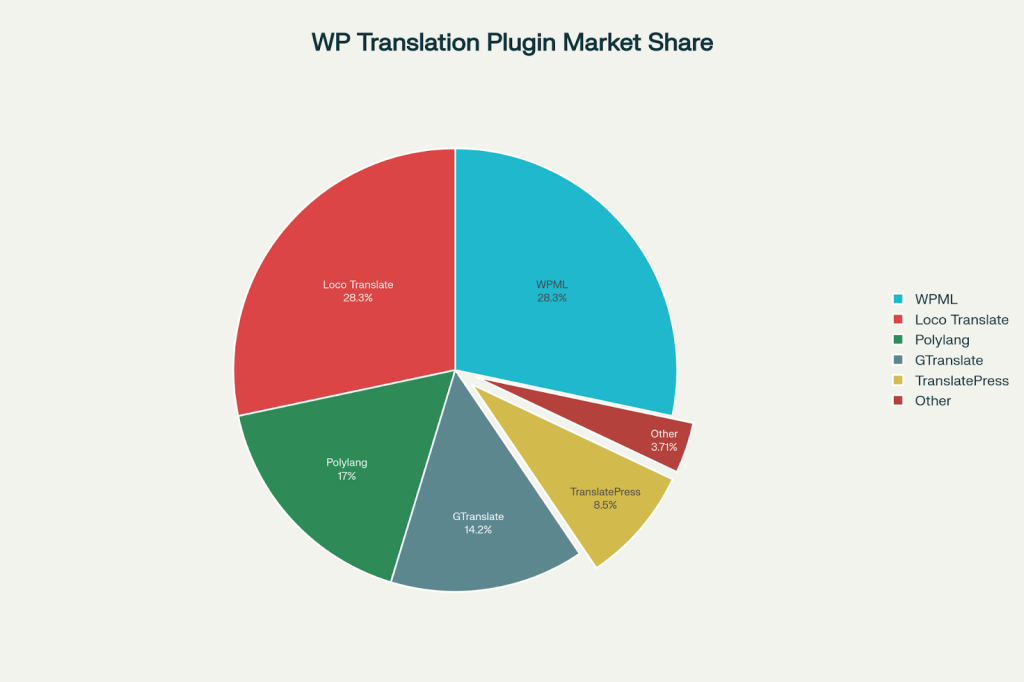
WordPress Translation Plugin Market Share by Active Installations
The WordPress translation plugin market is dominated by several key players, each serving different needs and budgets. WPML and Loco Translate lead with over 1 million active installations each, while newer solutions like TranslatePress and Weglot are rapidly gaining ground with their innovative approaches.
Performance Matters: Speed Test Results

WordPress Translation Plugin Performance Comparison
Performance is crucial for user experience and SEO. Real-world testing reveals significant differences between plugins. WPML and Polylang perform best with load times under 0.72 seconds, while cloud-based solutions like Weglot and TranslatePress add slightly more overhead but offer unique advantages in return.

Break language barriers – translate your WordPress site and reach global audiences today

Pooja Upadhyay
Director Of People Operations &
Client Relations
The 9 Best WordPress Translation Plugins
1. WPML (WordPress Multilingual Plugin)
Best For: Large businesses and complex websites
WPML remains the gold standard for WordPress translation with over 1 million active installations. It’s the most comprehensive solution available, supporting 65+ languages and offering both automatic and manual translation options.
Key Features:
- Advanced automatic translation using Google Translate, DeepL, and Microsoft Azure
- Translation memory and glossary for consistency across content
- Side-by-side editing for easy translation management
- Professional translation service integration
- Full WooCommerce support with multicurrency capabilities
Pricing: Starting at €39/year for the Multilingual Blog plan, €99/year for full CMS features
Pros: Most features, excellent support, SEO optimized, works with all themes and plugins
Cons: Steep learning curve, no free version, can be complex for beginners
2. TranslatePress
Best For: Users who want visual translation editing
TranslatePress revolutionized WordPress translation with its visual front-end editor. This approach allows you to translate content directly on your live website, making it incredibly user-friendly for non-technical users.
Key Features:
- Visual translation interface with live preview
- Google Translate and DeepL integration for automatic translation
- Unlimited languages support
- SEO-friendly URLs and metadata translation
- Works with any theme or plugin out of the box
Pricing: €79/year for premium features, free version available with 2 languages
Pros: Intuitive visual editor, works with page builders, good performance
Cons: Limited advanced features compared to WPML, can be resource-intensive
3. Weglot
Best For: Quick setup and cloud-based translation management
Weglot offers the fastest setup experience in the translation plugin market. With their cloud-based approach, you can have a multilingual website running in under 10 minutes.
Key Features:
- Automatic translation with manual editing capabilities
- Cloud-based storage reduces server load
- SEO optimization with hreflang tags and translated URLs
- In-context visual editor for easy translation management
- Team collaboration tools for translation workflows
Pricing: €9.90/month starting price, free plan for small sites
Pros: Extremely easy setup, good performance, professional translation services
Cons: Ongoing monthly costs, translations stored off-site, limited customization
4. Polylang
Best For: Budget-conscious users and simple multilingual sites
Polylang is a popular free option that provides solid multilingual functionality without the complexity of premium plugins. It’s perfect for blogs and straightforward websites.
Key Features:
- Easy-to-use interface with WordPress-native design
- SEO plugin compatibility with Yoast and RankMath
- Automatic metadata copying when translating content
- Language switcher widgets and menu integration
- No limits on number of languages
Pricing: Free core plugin, Pro version at €99/year
Pros: Free, lightweight, good SEO features, WordPress-native feel
Cons: Manual translation only, WooCommerce requires paid addon, limited theme translation
5. ConveyThis
Best For: AI-powered automatic translation with human refinement
ConveyThis combines cutting-edge AI translation with human editing capabilities. The plugin offers 120+ languages and focuses on delivering high-quality automated translations.
Key Features:
- AI-powered automatic translation with high accuracy
- Visual editor for translation refinement
- SEO optimization with hreflang tags and meta translation
- Professional translator network access
- 2-minute setup process
Pricing: Free plan with 2,500 words, paid plans starting at €6/month
Pros: Advanced AI translation, quick setup, good free plan, SEO optimized
Cons: Newer in market, cloud-based storage, limited advanced features
6. GTranslate
Best For: Budget-friendly automatic translation
GTranslate leverages Google Translate’s power to provide automatic translation for 103 languages. It’s one of the most cost-effective solutions for basic multilingual needs.
Key Features:
- Google Translate integration for automatic translation
- 103 languages supported covering 99% of internet users
- Multiple language switcher styles including flags and dropdowns
- WooCommerce compatibility
- Lightweight and fast performance
Pricing: Free version available, premium plans with SEO features
Pros: Completely free option, extensive language support, lightweight
Cons: Limited SEO features in free version, dependent on Google Translate quality
7. Lingotek (Ray Enterprise Translation)
Best For: Enterprise-level translation management
Lingotek provides enterprise-grade translation management with integration to professional translation services and advanced workflow management.
Key Features:
- Cloud-based translation management system
- Professional translation service integration
- Translation memory and terminology management
- Automated workflow management
- Microsoft Translator integration
Pricing: Free plan with 20,000 words, professional services additional
Pros: Enterprise features, professional services, translation memory
Cons: Complex setup, recent negative reviews after rebranding, limited community support
8. MultilingualPress
Best For: WordPress multisite networks
MultilingualPress takes a unique multisite approach where each language has its own dedicated WordPress installation, providing maximum flexibility and performance.
Key Features:
- Multisite-based architecture for optimal performance
- 174 languages supported
- SEO-friendly URLs with top-level domains
- WooCommerce optimization
- No content mixing between languages
Pricing: $199/year for single multisite license
Pros: Excellent performance, maximum flexibility, no plugin conflicts
Cons: Expensive, requires multisite setup, complex management
9. Loco Translate
Best For: Theme and plugin developers
Loco Translate specializes in translating WordPress themes and plugins rather than content, making it essential for developers and sites with extensive custom functionality.
Key Features:
- Built-in translation editor in WordPress admin
- Integration with DeepL, Google, Microsoft APIs
- Direct theme and plugin translation
- MO file compilation without server requirements
- Extract translatable strings from source code
Pricing: Completely free
Pros: Free, developer-focused, comprehensive string translation, lightweight
Cons: Not for content translation, requires technical knowledge, no automatic translation of posts


 Level Up With AddWeb
Feature Comparison: What Matters Most
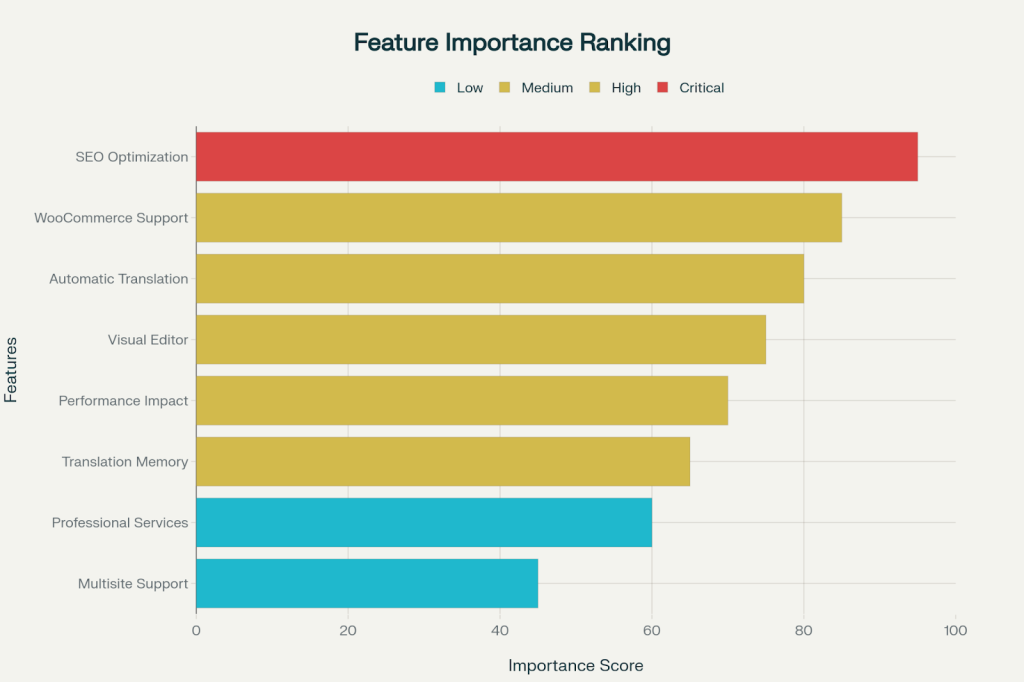
WordPress Translation Plugin Feature Importance Ranking
When choosing a translation plugin, SEO optimization ranks as the most critical feature, followed by WooCommerce support and automatic translation capabilities. Visual editors and performance impact are important but secondary considerations for most users.
Pricing Analysis: Finding the Right Fit for Your Budget
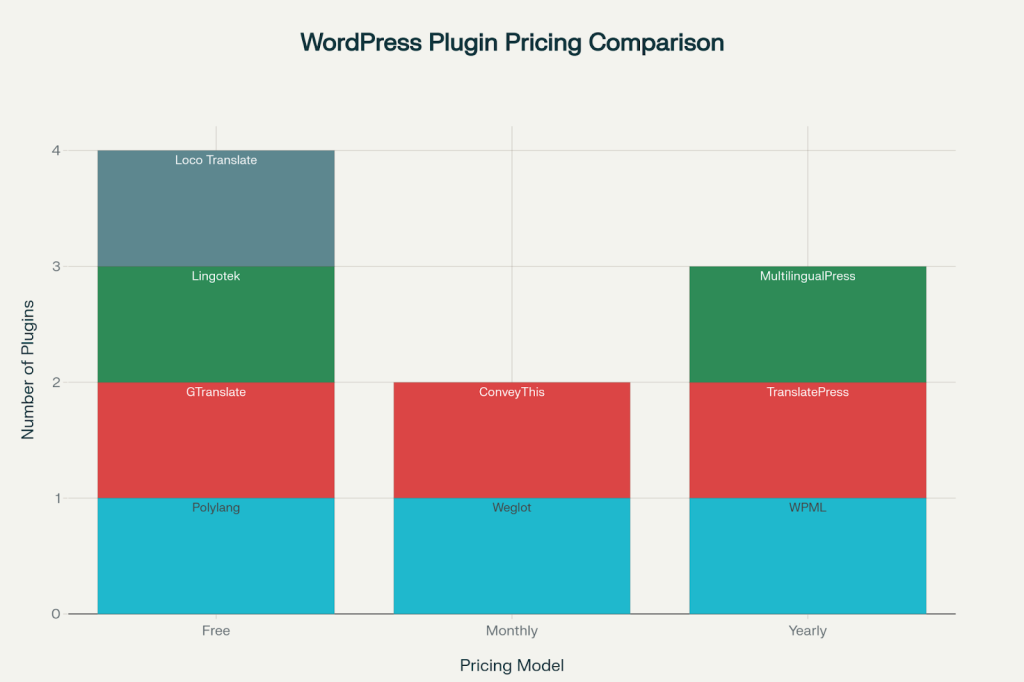
WordPress Translation Plugin Pricing Categories
The translation plugin market offers options for every budget, from completely free solutions like Polylang and Loco Translate to premium enterprise options like WPML and MultilingualPress. Monthly subscription models like Weglot and ConveyThis offer lower upfront costs but higher long-term expenses.
Performance Comparison: Speed vs Features
The performance tests reveal important trade-offs between features and speed. WPML has significantly improved its performance, achieving the fastest load times despite its feature-rich nature. Polylang remains the lightweight champion, while visual editors like TranslatePress and Weglot add some overhead but provide superior user experience.
SEO Considerations for Multilingual Websites
Search engine optimization is crucial for multilingual websites. The best plugins automatically handle:
- Hreflang tags for language targeting
- SEO-friendly URL structures with proper language indicators
- Meta title and description translation
- Sitemap generation for each language
- Integration with popular SEO plugins like Yoast and RankMath
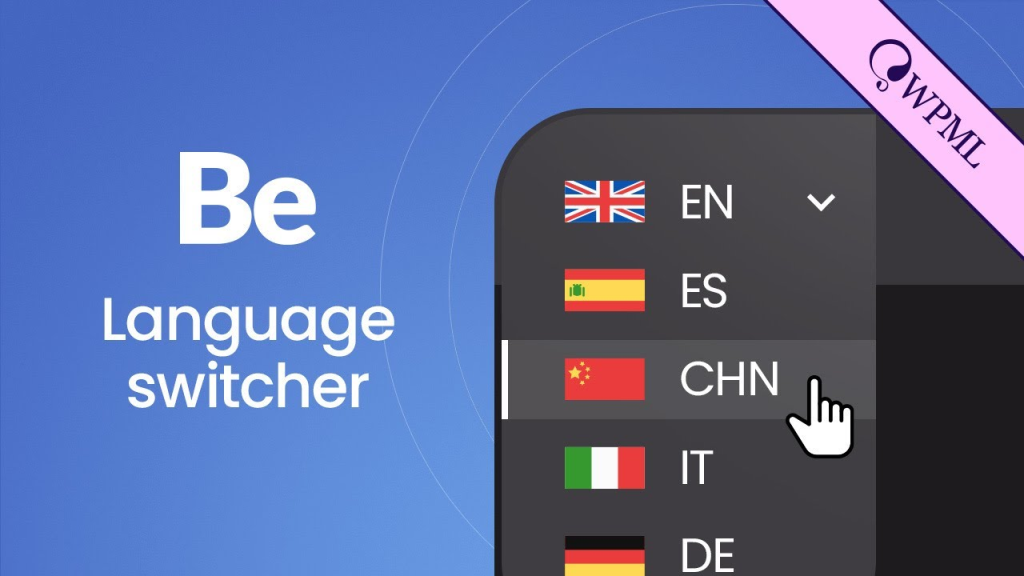
Language switcher dropdown menu showcasing multiple language options including English, Spanish, Chinese, Italian, and German flags with WPML branding
Key Decision Factors
Budget Considerations
- Free options: Polylang, Loco Translate, GTranslate
- Affordable solutions: ConveyThis, Weglot monthly plans
- Premium choices: WPML, TranslatePress, MultilingualPress
Technical Expertise Required
- Beginner–friendly: TranslatePress, Weglot, ConveyThis
- Moderate complexity: WPML, Polylang
- Advanced users: MultilingualPress, Loco Translate, Lingotek
Translation Approach
- Automatic + manual editing: WPML, TranslatePress, Weglot, ConveyThis
- Manual only: Polylang, MultilingualPress
- Professional services: WPML, Weglot, Lingotek
Making Your Choice: Recommendations by Use Case
For E-commerce Websites: WPML remains the top choice with comprehensive WooCommerce support and multicurrency features. TranslatePress and Weglot are excellent alternatives with easier setup.
For Blogs and Content Sites: TranslatePress offers the best balance of features and usability. Polylang is perfect for budget-conscious users who don’t mind manual translation.
For Enterprise Websites: WPML provides the most comprehensive feature set, while MultilingualPress offers superior performance for high-traffic sites.
For Quick Setup: Weglot and ConveyThis can have your site multilingual in minutes with minimal technical knowledge required.
For Developers: Loco Translate is essential for theme and plugin translation, while WPML offers the most extensive API for custom implementations.
Implementation Best Practices
Before You Start:
- Backup your website completely
- Plan your language strategy and target markets
- Consider your content volume and translation budget
- Evaluate your technical resources for ongoing management
During Implementation:
- Test thoroughly on a staging site first
- Optimize for performance with caching plugins
- Set up proper URL structures for SEO benefits
- Configure language switchers for optimal user experience
After Launch:
- Monitor site performance and loading speeds
- Track international traffic and conversion rates
- Regularly update translations as content changes
- Gather user feedback on translation quality
The future of multilingual websites is bright, with AI-powered translation becoming increasingly sophisticated and automatic localization expanding beyond just text to include cultural preferences and local regulations. As global e-commerce continues to grow, having a multilingual website isn’t just an advantage – it’s becoming a necessity for businesses serious about international expansion.
WordPress translation plugins have evolved from simple text replacement tools to sophisticated localization platforms. Whether you choose the comprehensive power of WPML, the visual simplicity of TranslatePress, the speed of Weglot, or the budget-friendly approach of Polylang, the key is selecting a solution that aligns with your technical expertise, budget, and long-term international growth goals.
The investment in multilingual functionality pays dividends in expanded market reach, improved user experience, and increased revenue potential. With the right translation plugin and proper implementation, your WordPress website can effectively communicate with audiences worldwide, breaking down language barriers and opening up new opportunities for growth and success.
Reference URLs:
- https://wordpress.com/plugins/conveythis-translate
- https://wordpress.org/plugins/conveythis-translate/
- https://www.conveythis.com/integrations/wordpress
- https://wordpress.com/plugins/gtranslate
- https://wordpress.org/plugins/gtranslate/
- https://wordpress.org/plugins/lingotek-translation/
- https://www.youtube.com/watch?v=lTRd2I5qYHw
- https://www.youtube.com/watch?v=2N_SM_qvpFg
- https://www.reddit.com/r/Wordpress/comments/t5i0f2/need_help_deciding_between_wpml_polylang_and/
- https://wordpress.com/blog/2025/04/17/wordpress-market-share/
About the Author: Mahima Dave is a Client Account Manager at AddWeb with 5+ years of experience in WordPress and client relationship management. She has been actively involved in the WordPress community through contributions and events, while also excelling at building strong client connections, ensuring seamless communication, and driving project success.