
Website speed isn’t just a nice-to-have feature – it’s absolutely critical for success. With WordPress powering 43.6% of all websites globally and 90% of users abandoning sites that take longer than 3 seconds to load, choosing the right caching plugin can make or break your online presence. The good news? The right caching solution can reduce your load times by up to 70% and dramatically improve user experience.
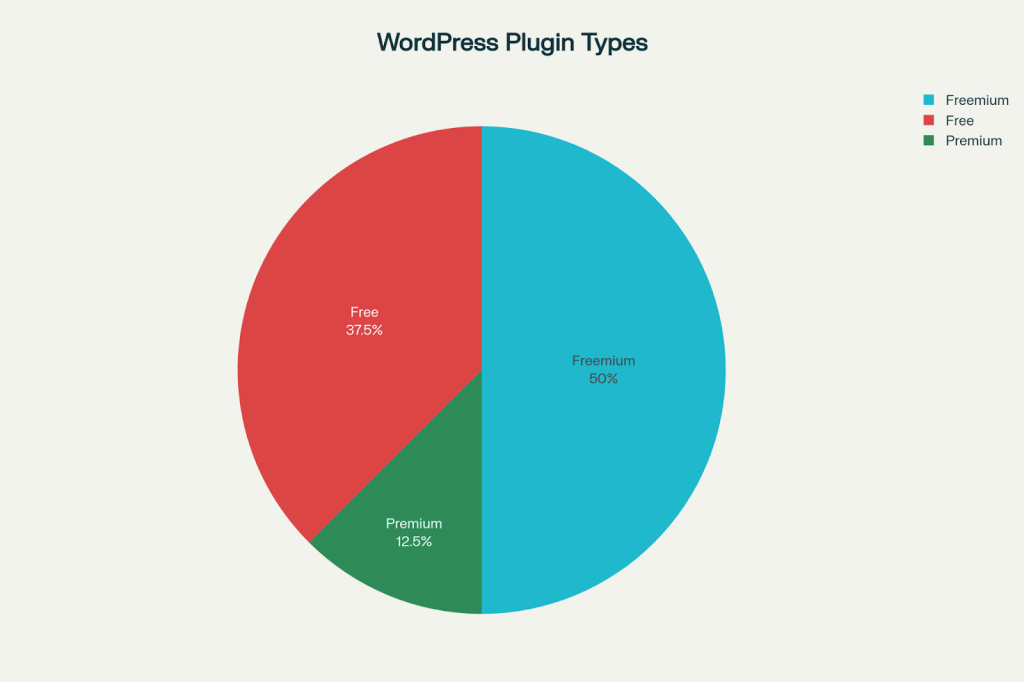
Distribution of WordPress Caching Plugin Types
Why WordPress Caching Matters More Than Ever
Every second counts in the digital world. Research shows that a 1-second delay in page load time can reduce conversions by 7%, while websites loading in 0-2 seconds achieve the highest conversion rates.

Transaction conversion rates drop significantly as page load time increases beyond 2 seconds, highlighting the importance of fast-loading websites
For WordPress sites, which require database queries and PHP processing for every page request, caching becomes essential for competitive performance.
The numbers speak volumes: faster websites rank better in search results, receive more traffic, and convert visitors at higher rates. Google’s Core Web Vitals have made page speed a direct ranking factor, making caching plugins not just performance tools, but SEO necessities.
Top WordPress Caching Plugins: The Definitive List
1. WP Rocket – The Premium Powerhouse
WP Rocket dominates the premium caching market with good reason, delivering exceptional performance with minimal effort. This plugin has earned its reputation as the gold standard for WordPress caching.

WP Rocket plugin cache settings dashboard showcasing mobile cache, user cache, and cache lifespan options for optimizing WordPress site performance
Performance Excellence:
- 1.71-second average load time – among the fastest tested
- 99% PageSpeed score achievable with proper configuration
- One-click setup that automatically applies 80% of optimization best practices
- 35% reduction in HTTP requests and significant page size optimization
Key Features:
- Automatic page caching with instant activation
- Advanced file optimization including CSS/JS minification and combination
- Image lazy loading for improved initial load times
- Database optimization tools for maintaining peak performance
- WooCommerce compatibility with automatic sensitive page exclusions
Pricing: Starting at $59 per year with 14-day money-back guarantee
Why Choose WP Rocket: Perfect for users who want professional results without technical complexity. The plugin’s intelligent defaults and comprehensive feature set make it ideal for business websites, e-commerce stores, and high-traffic blogs.
2. LiteSpeed Cache – The Free Performance Champion
LiteSpeed Cache leads the free plugin category with 6M+ active installations and an impressive 4.8/5 rating. This plugin offers enterprise-level features at zero cost.
Outstanding Performance:
- 1.65-second load time – the fastest among all tested plugins
caching_plugin_market_share.csv
Generated File
- 90% performance score with excellent Core Web Vitals optimization
- 0.023-second frontend execution time – significantly faster than competitors
- Server-level caching for unmatched speed when paired with LiteSpeed servers
Comprehensive Features:
- QUIC.cloud CDN integration at no additional cost
- Advanced image optimization with lossy and lossless options
- Critical CSS generation for improved above-the-fold rendering
- WebP/AVIF support for next-generation image formats
- Database optimization and cleanup tools
Special Advantages:
- ESI (Edge Side Includes) support for dynamic content caching
- HTTP/3 and QUIC protocol support for cutting-edge performance
- WordPress CLI integration for developers
- Multisite network support for complex installations
Perfect For: Budget-conscious users who need professional-grade performance, developers seeking advanced features, and anyone using LiteSpeed hosting.

Make your WordPress site lightning-fast with the right caching plugin.

Pooja Upadhyay
Director Of People Operations &
Client Relations
3. WP Super Cache – The Reliable Workhorse
Created by Automattic (WordPress.com’s parent company), WP Super Cache remains the most trusted free caching solution with 2M+ active installations.
Proven Performance:
- 1.86-second average load time with consistent results
- 87% PageSpeed score improvement from baseline performance
- Three caching modes for different server configurations
- Stable performance under high traffic loads
Core Strengths:
- Expert and Simple modes catering to different skill levels
- Cache preloading to prepare static files in advance
- Garbage collection for automatic old cache cleanup
- CDN support for global content delivery
- Mobile device caching optimization
Technical Features:
- mod_rewrite caching for maximum performance
- PHP caching mode for shared hosting compatibility
- Cache compression to reduce storage requirements
- Known user exclusions for personalized content
Why Choose WP Super Cache: Ideal for users seeking reliability over complexity. Its straightforward approach and WordPress.com backing make it perfect for blogs, small business sites, and anyone wanting dependable caching without premium costs.

Load Time Performance Comparison of WordPress Caching Plugins
4. W3 Total Cache – The Feature-Rich Powerhouse
W3 Total Cache offers the most comprehensive free caching solution, though it requires technical expertise to optimize properly. This plugin provides enterprise-level features at no cost.
Advanced Capabilities:
- Multiple cache types: Page, database, object, and browser caching
- Google PageSpeed integration for in-dashboard testing
- Fragment caching for dynamic content optimization
- CDN support for major providers
- Minification engine for CSS, JavaScript, and HTML
Performance Results:
- 2.30-second load time with proper configuration
- 85% performance score achievable
- 16 configuration pages offering granular control
- Database query caching for dynamic content optimization
Professional Features:
- Object caching with Memcached and Redis support
- Browser caching with extensive file type control
- Mobile theme support for responsive optimizations
- Import/export settings for multi-site management
Considerations: The plugin’s complexity can overwhelm beginners, but experienced users gain unparalleled control over every caching aspect.
5. WP Fastest Cache – The Balanced Solution
WP Fastest Cache strikes the perfect balance between functionality and simplicity, earning 1M+ active installations and a 4.6/5 rating.
User-Friendly Performance:
- 2.40-second load time with straightforward setup
- 83% performance score achievable
- Simple interface that doesn’t overwhelm users
- One-click cache clearing for easy maintenance
Practical Features:
- Cache expiration rules for different content types
- Mobile caching optimization
- CDN integration support
- URL exclusion options for dynamic pages
- Minification tools for CSS and HTML
Premium Add-ons:
- Database optimization tools
- Image optimization features
- Advanced cache exclusions
- Premium support access
Pricing: Free core version, premium features from $49.99/year
6. Hummingbird – The All-in-One Optimizer
Developed by WPMU DEV, Hummingbird combines caching with comprehensive performance monitoring, making it ideal for users who want detailed insights alongside optimization.
Comprehensive Features:
- Performance reports with actionable recommendations
- Uptime monitoring to track site availability
- Asset optimization with safe mode testing
- Database cleanup with scheduled automation
- CDN integration through WPMU DEV network
Performance Metrics:
- 2.90-second load time with full optimization
- 81% performance score achievable
- Scheduled optimization for hands-off maintenance
- Gzip compression for faster file transfers
Unique Advantages:
- Performance tracking over time
- Safe mode testing for conflict resolution
- Font optimization for improved Core Web Vitals
- Config templates for easy site-to-site deployment
Pricing: Free basic version, Pro from $5/month as part of WPMU DEV membership
7. Cache Enabler – The Lightweight Champion
Created by KeyCDN, Cache Enabler focuses on simplicity and speed, delivering essential caching without bloat.
Streamlined Performance:
- 2.70-second load time with minimal resource usage
- 78% performance score
- Lightweight footprint that doesn’t slow admin areas
- Real-time cache size monitoring
Essential Features:
- Gzip and Brotli compression support
- Custom post type compatibility
- Cache exclusion rules by post ID
- Automatic cache clearing on content updates
Perfect For: Users seeking minimal complexity with maximum reliability. Ideal for small to medium websites that need basic but effective caching.
8. WP-Optimize – The Database Specialist
WP-Optimize combines caching with database optimization, making it perfect for sites needing comprehensive maintenance.
Dual-Purpose Functionality:
- 2.70-second load time with optimization
- 80% performance score
- Database cleanup tools
- Image compression features
- Scheduled maintenance automation
Database Focus:
- Post revision cleanup
- Spam comment removal
- Transient optimization
- Table optimization
Pricing: Free core features, premium from $39/year

Market Share Distribution of WordPress Caching Plugins in 2025
Performance Analysis: The Numbers Don’t Lie
Recent testing reveals significant performance differences among caching plugins:
Speed Champions:
- LiteSpeed Cache: 1.65s (Fastest overall)
- WP Rocket: 1.71s (Best premium option)
- WP Super Cache: 1.86s (Top free choice)
Performance Score Leaders:
- WP Rocket: 99% (Premium excellence)
- LiteSpeed Cache: 90% (Free powerhouse)
- WP Super Cache: 87% (Reliable performer)
Choosing Your Perfect Plugin: Decision Matrix
| Use Case | Recommended Plugin | Why |
| Premium Performance | WP Rocket | Best-in-class features, one-click setup, professional support |
| Budget Excellence | LiteSpeed Cache | Fastest free option, enterprise features, server optimization |
| Reliable Simplicity | WP Super Cache | WordPress.com backing, proven stability, straightforward |
| Advanced Control | W3 Total Cache | Comprehensive options, multiple cache types, granular settings |
| Balanced Approach | WP Fastest Cache | User-friendly interface, solid performance, reasonable pricing |
| Performance Monitoring | Hummingbird | Built-in analytics, uptime monitoring, comprehensive reports |
| Lightweight Solution | Cache Enabler | Minimal footprint, essential features, KeyCDN integration |
| Database Focus | WP-Optimize | Combined caching and cleanup, scheduled maintenance |
Implementation Best Practices
Pre-Installation Checklist
- Backup your website before installing any caching plugin
- Choose only one caching plugin to avoid conflicts
- Check hosting compatibility, especially for LiteSpeed Cache
- Review current performance using tools like GTmetrix or PageSpeed Insights
Configuration Essentials
- Enable page caching as the primary speed boost
- Configure browser caching for returning visitors
- Set up minification carefully to avoid breaking functionality
- Enable GZIP compression for faster file transfers
- Test mobile performance separately from desktop
Optimization Strategies
- Use CDN integration for global audience reach
- Enable image lazy loading to improve initial load times
- Configure cache preloading for popular pages
- Set appropriate cache expiration based on content update frequency
- Monitor performance regularly to maintain optimization gains

WordPress caching plugin dashboard with performance optimization metrics


 Level Up With AddWeb
Common Pitfalls to Avoid
Plugin Conflicts
- Never run multiple caching plugins simultaneously
- Test compatibility with existing optimization plugins
- Check theme compatibility before finalizing settings
- Disable conflicting server-level caching when using plugin caching
Configuration Mistakes
- Avoid aggressive minification that breaks functionality
- Don’t cache user-specific pages like dashboards or checkouts
- Test all features after enabling optimization
- Keep cache exclusions for dynamic content
Maintenance Oversights
- Clear cache after site updates
- Monitor performance metrics regularly
- Update plugins promptly for security and compatibility
- Review settings after major WordPress updates
Future-Proofing Your Speed Strategy
The caching landscape continues evolving with WordPress’s growing emphasis on performance. Core Web Vitals integration, HTTP/3 support, and advanced image optimization are becoming standard features across top plugins.
Emerging Trends
- Server-level caching integration for maximum performance
- AI-powered optimization for automatic settings adjustment
- Advanced image formats (WebP, AVIF) becoming standard
- Edge caching networks for global performance optimization
Making Your Final Decision
Success with WordPress caching depends on matching plugin capabilities with your specific needs. Consider your technical expertise, budget constraints, performance requirements, and hosting environment when making this crucial choice.
Whether you choose the comprehensive power of WP Rocket, the exceptional value of LiteSpeed Cache, the reliable simplicity of WP Super Cache, or the advanced features of W3 Total Cache, each plugin offers unique advantages for specific use cases.
Remember: the best caching plugin is the one you’ll actually configure and maintain properly. Start with your chosen solution, monitor performance improvements, and fine-tune settings based on real-world results. Your users—and your search rankings—will thank you for the investment in speed.
In today’s fast-paced digital world, slow websites simply don’t survive. Choose your caching plugin wisely, implement it thoroughly, and watch your WordPress site transform into a speed demon that delights visitors and dominates search results.
- https://kinsta.com/wordpress-market-share/
- https://wordpress.com/blog/2025/04/17/wordpress-market-share/
- https://www.wpbeginner.com/plugins/litespeed-cache-vs-wp-rocket-which-one-is-better/
- https://wordpress.org/plugins/litespeed-cache/
- https://wordpress.org/plugins/hummingbird-performance/
- https://www.reddit.com/r/Wordpress/comments/11jnfay/wp_rocket_is_it_worth_it/
- https://wordpress.com/plugins/hummingbird-performance
- https://www.reddit.com/r/Wordpress/comments/16xdffb/do_you_find_the_litespeed_cache_plugin_useful/
About the Author: Mahima Dave is a Client Account Manager at AddWeb with 5+ years of experience in WordPress and client relationship management. She has been actively involved in the WordPress community through contributions and events, while also excelling at building strong client connections, ensuring seamless communication, and driving project success.